TIKTOK SHOP U.S. · BFCM OPERATIONS
Do Not Assume the BFCM Fulfillment Extension Covers Every TikTok Shop Order
Direct answer: treat a BFCM fulfillment extension as an order-level rule, not a shop-wide permission slip. Open the order record, identify its order type and placed time, then apply the current campaign table or the standard service-level agreement. If the order is pre-order or back-order, the BFCM guide says the extension does not apply.
Define the extension before using it
A fulfillment extension is a change to the deadline that applies only when an order satisfies the stated campaign conditions. It is not Holiday Mode, a promise that enforcement is suspended, or evidence that the parcel was dispatched. The team must still identify the exact order, read its active deadline and preserve the event that proves the required fulfillment step occurred.
Separate three questions. First, is this order inside the current official campaign window? Second, is its order type eligible? Third, what native deadline and status does Seller Center show now? A yes to the first question does not answer the other two. The order record is the control point because campaigns, shipping methods and special-order settings can create different deadlines inside one shop.
Classify every open order before calculating risk
Use at least four classes: regular orders that appear to meet the current BFCM conditions, regular orders outside the listed window, pre-orders, and back-orders. Add a fifth exception class for any order whose type, route or deadline cannot be confirmed. Unknown is a working status that needs an owner and readback, not permission to assume the longest possible deadline.
Pre-order and back-order deserve explicit separation because the current BFCM guide says the campaign extension does not apply to them. Those orders follow their own configured or policy-based timing. A warehouse label, campaign badge or product name cannot substitute for the order-level type and deadline shown in the system.
Build the deadline from evidence, not memory
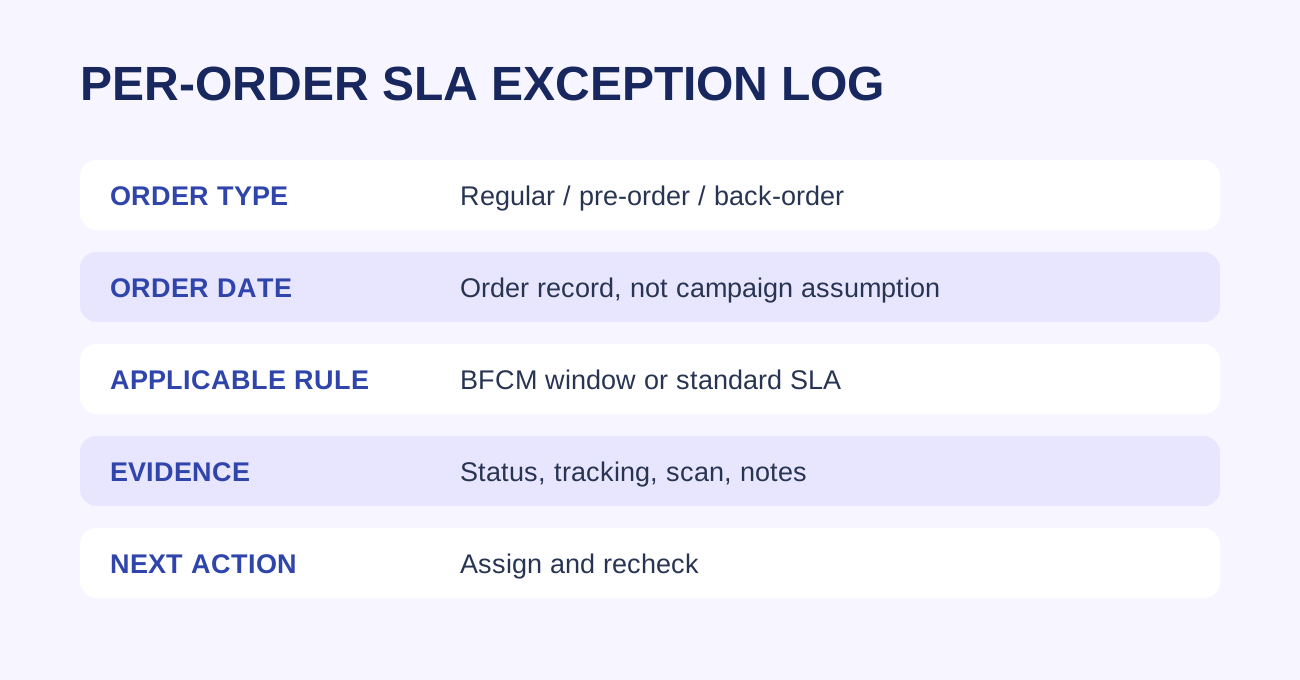
For each row, preserve the order-created timestamp, order type, shipping path, current native dispatch deadline, the source that explains that deadline and the next evidence event. If the official campaign table is updated, save the version or revalidation date used for the decision. If Seller Center displays a different deadline, stop and resolve the discrepancy rather than overwriting the native value with a spreadsheet formula.
The deadline board should distinguish calculated expectations from observed platform state. Mark an expected campaign extension as pending until the order record confirms it. Mark carrier handoff or a qualifying dispatch event only after the native or physical evidence exists. This prevents a planning assumption from becoming an inaccurate completion status.
Use one owner for each failure mode
Inventory holds belong with the inventory owner. Picking and packing backlog belongs with warehouse operations. Label or system failures belong with the platform-support owner. Missing carrier acceptance belongs with the handoff owner. A deadline problem can contain several failures, so the board needs both a primary owner and the next evidence required to close the row.
Escalation should occur before the active deadline, not after the late-order metric changes. Set readback times around warehouse cutoffs and carrier collections. When a row remains unresolved, preserve the prior evidence, record the exact question and assign the next action. Do not replace an Unknown with a confident guess merely to make the board look complete.
Understand the trade-off between speed and accuracy
A team can review orders quickly by applying one campaign assumption to the whole queue, but that creates false safety. A fully manual review of every field can be accurate but too slow during a peak. The practical balance is rule-based triage followed by order-level verification for exceptions, at-risk deadlines and any row whose native record conflicts with the expected campaign rule.
Automate collection, not judgment. A report can pull order ID, type, placed time and displayed deadline. A human owner should still verify policy fit, exception status and evidence quality. The goal is a queue that becomes smaller and more certain at each readback, rather than a large dashboard that repeats unverified data.
Run a three-pass daily control
- Opening pass. Pull every open order, classify its type and record the displayed deadline.
- Pre-cutoff pass. Compare remaining work with warehouse and carrier capacity, then escalate rows that may miss their active deadline.
- Closing pass. Read the native status again, attach the final evidence and leave unresolved orders open with a named next owner.
During heavy BFCM volume, increase the frequency of the middle pass rather than loosening the evidence standard. High volume changes review cadence, not the meaning of dispatched, handed off or complete.
A hypothetical order example
This is an operating example, not a client result. Three orders arrive on the same calendar day. Order A is a regular order inside the currently listed BFCM window and Seller Center shows an adjusted deadline. Order B is a pre-order with its own shipping commitment. Order C has an unclear type because a catalog setting changed after purchase.
The operator accepts the displayed adjusted deadline for Order A and still tracks dispatch evidence. Order B remains outside the campaign extension and follows its pre-order timing. Order C stays Unknown until the native record and applicable policy are resolved. One date produced three different decisions because eligibility and evidence were reviewed per order.
Start with a deadline board, not a campaign slogan
A peak-period team needs one row per open order: order ID, type, order placed time, shipping path, applicable SLA, deadline, dispatch evidence, owner and next readback. The board prevents a regular order in an eligible window from being mixed with a pre-order, back-order or another exception that must follow a different rule.
The operating sequence
- Pull open orders at a fixed daily cut-off.
- Classify the order from the order record, not from a warehouse label.
- Check the BFCM guide's current order-date window and shipping context.
- Mark pre-order and back-order as exceptions to the BFCM SLA extension.
- Capture tracking, qualifying scan or other applicable dispatch evidence.
- Escalate rows that cannot be resolved before their active deadline, then re-read the order after action.
Keep the normal fulfillment controls alive
The campaign guide points sellers back to the normal Fulfillment Policy for baseline requirements. The policy and late-dispatch material make clear that dispatch performance remains order-specific and evidence-dependent. An extension changes only the applicable deadline when its conditions are met. It does not turn a missing handoff, incorrect tracking record or unresolved exception into timely dispatch.
Smallest useful next action
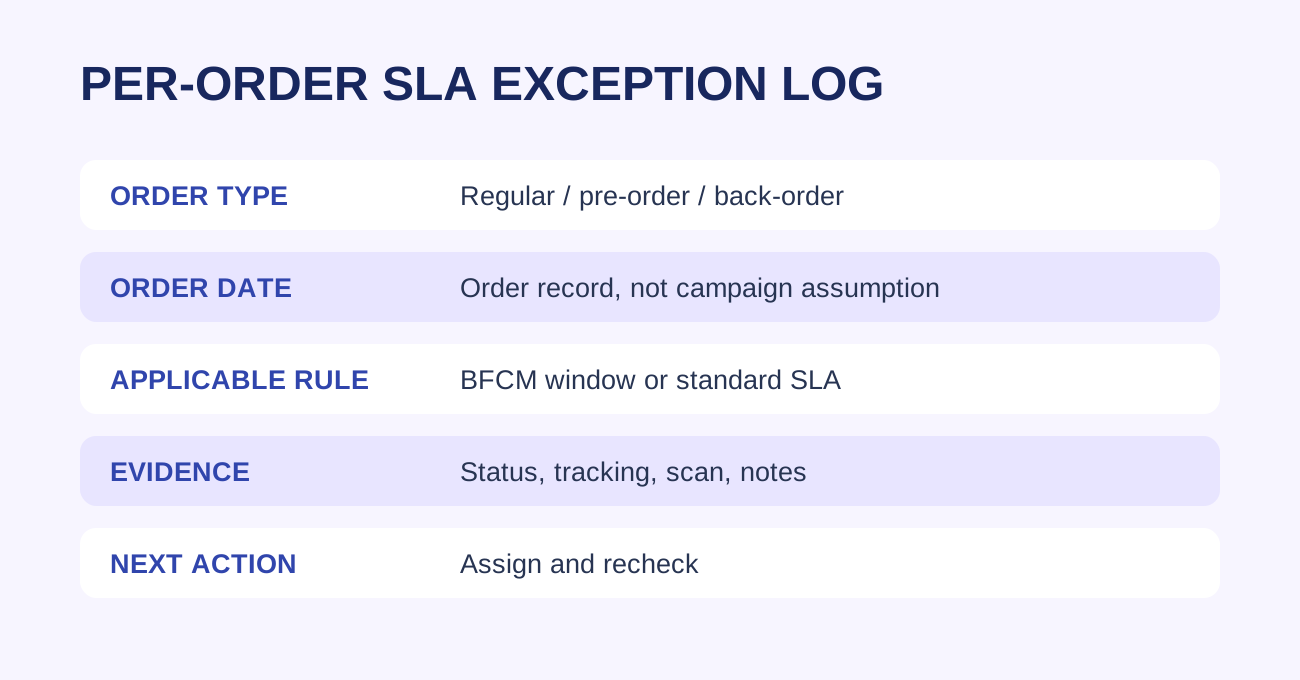
Before the next shift, add the five fields every open order needs: type, placed time, applicable SLA, deadline source and evidence state. Route every blank field to a named owner. This is a WEM operating framework, not a TikTok Shop policy threshold.
Source notes and execution boundary
This article draws on the current 2026 BFCM Seller Campaign Guide, Fulfillment Policy and Late Dispatch Rate Requirements, revalidated October 15, 2026. The guide states that BFCM orders in listed windows receive extended fulfillment SLAs and that the extensions do not apply to pre-order and back-order. Platform rules, windows and interfaces can change. Verify the live official guide and each current order record before execution.
Related WEM guides
Frequently asked questions
Does BFCM extend every order?
No. Review each order against the current campaign window and its order type.
Are pre-orders covered?
The BFCM guide says SLA extensions do not apply to pre-order or back-order.
What proves dispatch?
Use the applicable qualifying dispatch evidence and order status, not a warehouse assumption.
Can a campaign date replace order-level review?
No. The order record and applicable rule determine the deadline.
What should the daily owner do?
Maintain an exception log, assign an owner and recheck unresolved orders.
What if the rule is unclear?
Verify the current Seller Center order record and official policy before acting.