Set TikTok Shop Order Capacity Before a Q4 Demand Spike Sets It for You
Convert real warehouse throughput into a limit, trigger ladder and order-level readback.
Direct answer: set TikTok Shop order capacity from the number of orders the operation can repeatedly make carrier-ready within its real labor, inventory and pickup windows. Do not use a stretch sales target, the best day the warehouse ever had, or a campaign forecast as the setting. The current U.S. Order Handling Capacity guide says the tool is intended to hold an estimated daily maximum, provide fulfillment-deadline and estimated-delivery extensions for orders above that capacity, and pace a larger surge when order volume exceeds three times the set capacity. Those protections are not permission to overstate throughput. They work only when the number reflects the operation.
WEM’s practical model is a capacity sheet plus a trigger ladder. The sheet converts observed work into a conservative ceiling. The ladder names what changes as the backlog approaches that ceiling, exceeds it, or begins to create cancellation and dispatch risk. The platform setting is one control inside that system. Inventory truth, staffing, packaging, carrier handoff and order-level SLA readback remain separate controls.
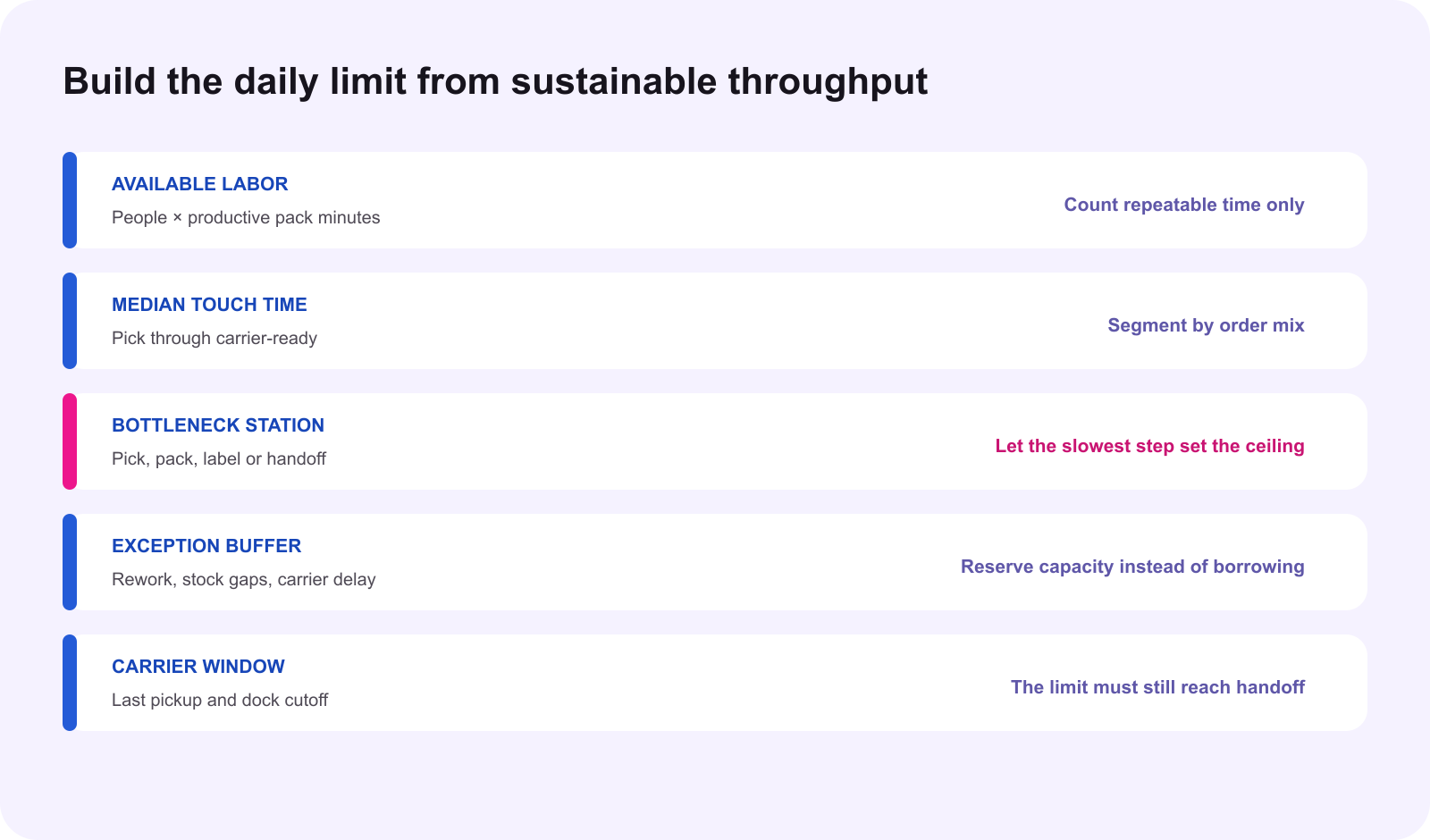
Measure carrier-ready output, not orders received
A capacity number should describe finished operational output. Count an order only when the correct SKU has been picked, packed, labeled, checked and staged for the carrier within the applicable cutoff. Orders that entered the queue but remain blocked by stock, address, package, label or carrier issues are backlog, not throughput. Use at least several normal operating days and separate ordinary shifts from unusual overtime or emergency staffing.
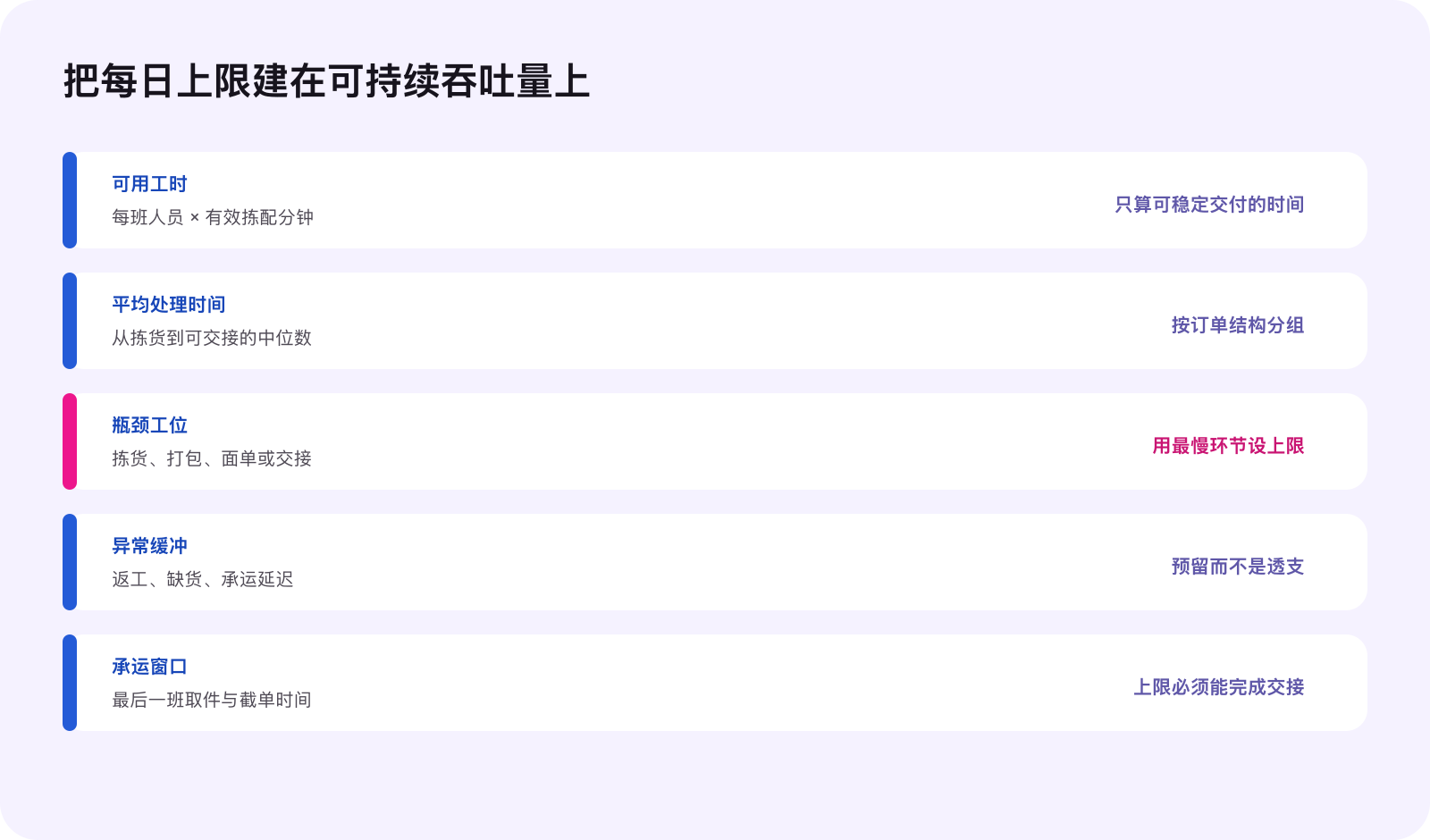
Start with the bottleneck. If picking can support 900 orders, packing 620, label verification 760 and the final carrier window only 540, the sustainable ceiling cannot be 900. This is a hypothetical operating example, not a recommended TikTok Shop setting. The purpose is to let the slowest repeatable step control the initial limit. Then subtract an explicit exception buffer for rework, stock discrepancies, damaged goods, late inbound inventory and missed scans.
Build one capacity row for each meaningful order mix
One average can hide the work created by bundles, fragile items, oversize parcels, personalization or multi-item orders. Group orders only where touch time, packaging and handoff are genuinely similar. For each group, record median touch time, people assigned, productive minutes, error rate, carrier cutoff and the maximum units that can be made carrier-ready without borrowing from the next day.
Translate the groups into one daily ceiling only after accounting for the forecast mix. If a LIVE session is expected to sell a labor-heavy bundle, do not apply the single-item rate to every forecast order. Label unknown inputs as unknown and use a lower temporary limit until the first real readback. A precise-looking number built from invented inputs is weaker than a conservative range with named evidence.
Set the tool before the demand event
The current Order Handling Capacity guide says sellers can review and update the limit as needed, with changes effective the next day. That makes same-hour reaction unreliable. Before a BFCM push, creator drop or large LIVE session, confirm the setting, the fulfillment-deadline extension control and the visible account behavior in Seller Center. Record the previous value, new value, reason, owner and expected effective date.
Do not assume that entering a number completes the setup. The guide separates the daily capacity setting from the fulfillment-deadline extension setup. Confirm the live toggle and save a readback after the effective date. If the feature is absent, unavailable or behaves differently in the account, mark the state unknown and manage the queue with staffing, assortment, traffic and carrier controls rather than pretending the platform protection exists.
Understand what happens above the limit
Current guidance says orders beyond the daily capacity can receive an additional business day for the dispatch SLA and an adjusted estimated delivery time, subject to the platform’s evaluation. It also describes surge protection when order volume exceeds three times the set daily capacity. These are platform behaviors, not a promise that every operational problem disappears. The team still has to identify which orders received which deadlines.
Keep an order-level deadline board. Store the order ID, order type, Awaiting Shipment time, current dispatch deadline, capacity-trigger status, warehouse, assigned shift, carrier window and latest readback. Never extend every order in an internal spreadsheet merely because the daily total crossed the threshold. The current order record is the evidence.
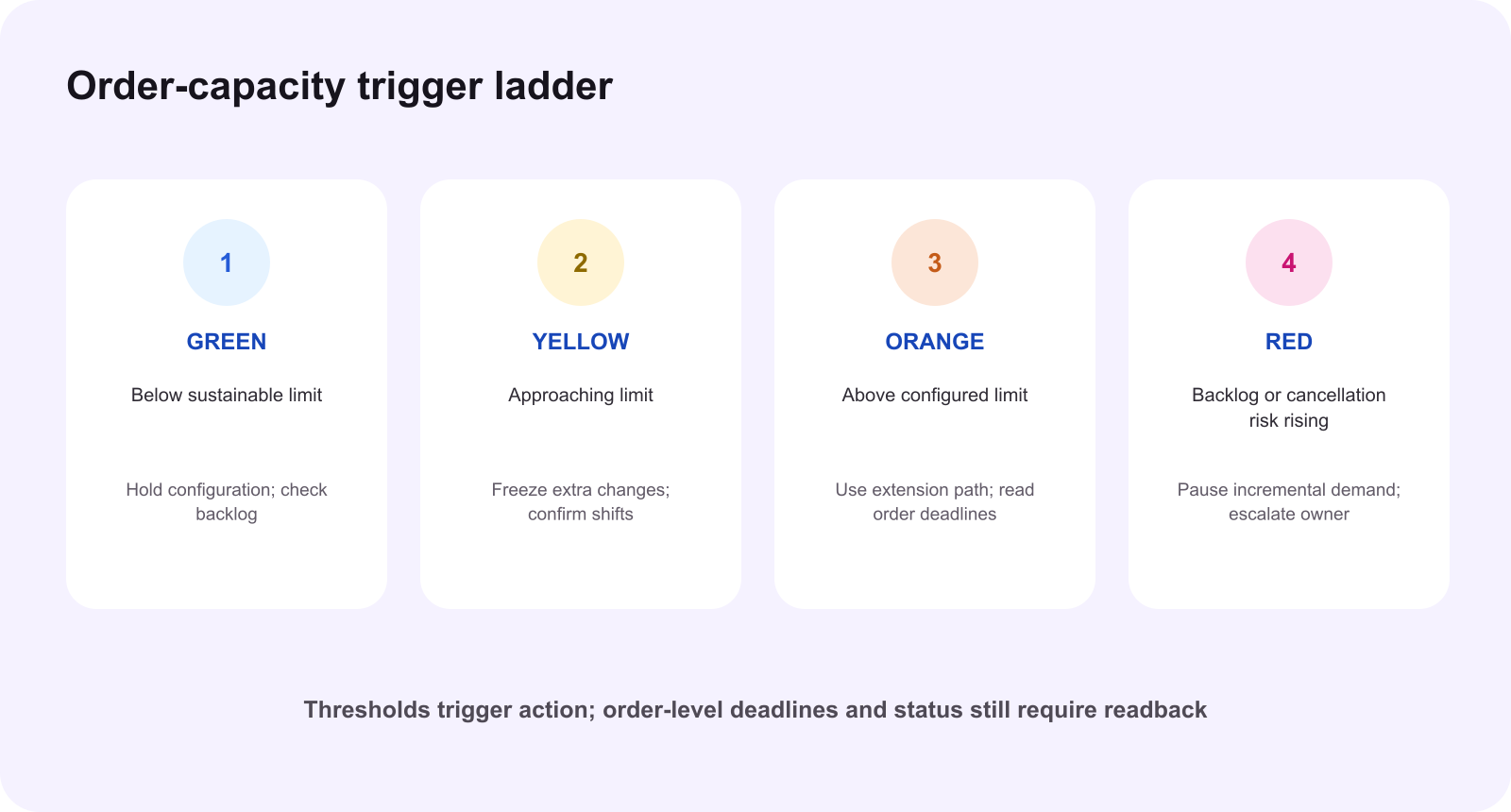
Use a trigger ladder before the queue becomes a crisis
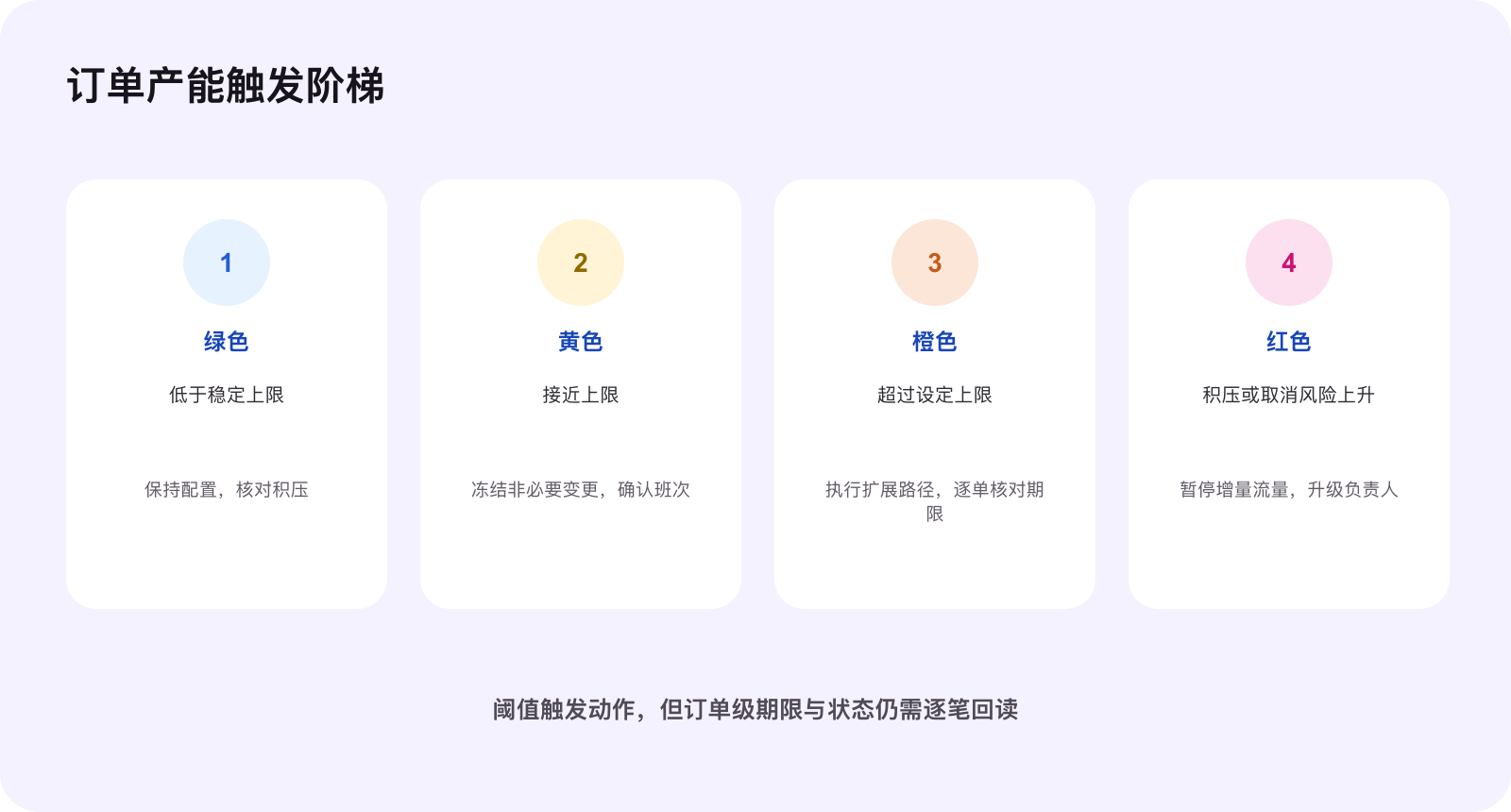
The green state is normal operation below the sustainable limit. Confirm stock, staffing, pickup booking and backlog age. Yellow means demand is approaching the ceiling. Freeze nonessential assortment or packaging changes, confirm the next shift and move exception owners into the queue. Orange means the set limit has been exceeded. Verify whether the platform applied the expected deadline path, protect priority orders and review the next carrier handoff. Red means backlog age, seller-fault cancellation or dispatch risk is rising. Pause incremental demand, escalate the named operator and reduce the promise until terminal evidence shows the queue is recovering.
The thresholds should be written before the event. A team that decides every action after the dashboard turns red will usually add labor, traffic, discounting and product changes at the same time. That destroys the learning signal and can increase errors. Use one owner for the capacity setting, one for warehouse execution and one for demand controls, with a single decision timestamp.
Connect capacity to BFCM eligibility without claiming a guarantee
The current 2026 BFCM seller guide lists SPS, LDR, account health and compliant in-stock products among eligibility controls. It states an SPS threshold of 3.5 or higher and LDR below 20 percent for the guide’s eligibility checklist, while also explaining that campaign benefits may change when shop performance falls. Capacity discipline can reduce avoidable late dispatch and cancellation pressure. It does not guarantee registration, product approval, campaign benefits or traffic.
Read the live campaign page and the exact shop status. Treat a passing screenshot as evidence for that moment, not a promise for the whole event. If a shop has no SPS yet, follow the newer-shop conditions shown in the current guide. Keep the capacity decision separate from product registration, pricing and inventory allocation so a campaign change does not silently rewrite the warehouse promise.
Use the Logistics and Fulfillment Score as a diagnosis surface
On October 14, 2026, the current Logistics and Fulfillment Score guide says its new version is still in a preview-only trial through October 14 and is scheduled to launch October 15. It describes Dispatch Time, Transit Time, Seller Fault Cancellation Rate and a Free Shipping Coverage bonus as components of the new score, with category-based comparisons and phased access. Because the launch is scheduled for the next day, verify the current Seller Center version before making any decision from this article.
Do not reverse-engineer a capacity number from a single score. Use affected-order details to locate the operational cause. Slow dispatch may point to picking, packing, label, cutoff or scan delay. Slow transit may point to service or carrier selection. Seller-fault cancellation may point to inventory truth or an overcommitted promise. Fix the named constraint and then watch the relevant order cohort.
Run a short daily capacity review
| Evidence | Decision | Owner |
|---|---|---|
| Yesterday’s carrier-ready output and backlog age | Keep or lower sustainable ceiling | Warehouse lead |
| Today’s staffing, order mix and inventory exceptions | Adjust internal allocation | Operations lead |
| OHC setting, toggle and effective-date readback | Confirm platform control | Seller Center owner |
| Order-level dispatch deadlines | Prioritize exact packages | Fulfillment owner |
| LDR, cancellation and affected-order evidence | Repair named constraint | Performance owner |
| Traffic, campaign and LIVE plan | Hold, reduce or reopen demand | Growth owner |
Close the review with one decision: keep the setting, lower it, increase it with evidence, or stop incremental demand while a constraint is repaired. Record the decision, owner, effective time and next readback. Do not call the change successful because it was saved. Success means the live setting is confirmed and the order queue returns to a controlled state without hiding late orders.
The smallest useful action today
Select one recent normal warehouse shift. Count only orders that became carrier-ready before the actual handoff cutoff. Record productive labor minutes, median touch time, bottleneck station, exception percentage and unfinished backlog. Calculate a conservative daily ceiling, compare it with the current Seller Center setting, and write the yellow, orange and red actions before changing anything. If the required evidence is missing, label the setting unvalidated and start measuring rather than guessing.
Source notes
This original WE Marketing operating framework draws on complete current TikTok Shop U.S. Seller University guidance on the Order Handling Capacity Tool, Fulfillment Policy, 2026 BFCM Seller Campaign Guide, Logistics and Fulfillment Score, and Best Practices for Order Fulfillment, revalidated October 14, 2026. Feature access, thresholds, score versions, launch timing, campaign requirements and order deadlines can change. Verify the current U.S. Seller Center and exact order records before execution.
Common questions
What does TikTok Shop daily order capacity mean?
It is the estimated maximum number of orders the shop can handle efficiently each day. Set it from measured operational throughput, not from a sales target.
Does the Order Handling Capacity tool stop all orders at the limit?
No. Current guidance describes deadline and EDT extensions for excess orders and surge pacing when volume exceeds the configured threshold. Confirm the live account behavior before relying on it.
When does a capacity change take effect?
The current Order Handling Capacity guide says changes become effective the next day, so the setting should be reviewed before a known campaign or LIVE spike.
Does an SLA extension mean the warehouse can ignore a backlog?
No. An extension changes the applicable deadline for eligible excess orders. The seller still needs accurate stock, preparation, handoff and order-level readback.
Why connect capacity with BFCM eligibility?
The current BFCM guide includes fulfillment health and LDR among campaign eligibility controls. Capacity is an operating guardrail that helps prevent avoidable delays; it does not guarantee eligibility.
What is the smallest useful action today?
Measure one recent normal shift, identify the bottleneck step, calculate a conservative daily ceiling, name the owner and record the trigger action before changing the setting.