TIKTOK SHOP U.S. · ORDER CONTROL
TikTok Shop Order Cancellation Control: Pending, Awaiting Shipment and Auction Orders
Direct answer: cancellation is an order-state decision, not a support shortcut
A buyer’s wish to cancel does not give every order the same operational path. Before a team promises a result, it must identify the current order state, the fulfillment handoff already completed, the order type, the reason supplied, the live Seller Center action and the clock displayed on that case. Pending, Awaiting Shipment and auction orders can require different handling. Treating them as one generic “cancel” queue creates false promises, duplicate work and avoidable fulfillment exceptions.
The operator’s job is not to memorize a universal outcome. It is to classify the order, preserve the request and read back the action that the current account actually presents. If the state or action is missing, mark it missing and escalate rather than guessing.
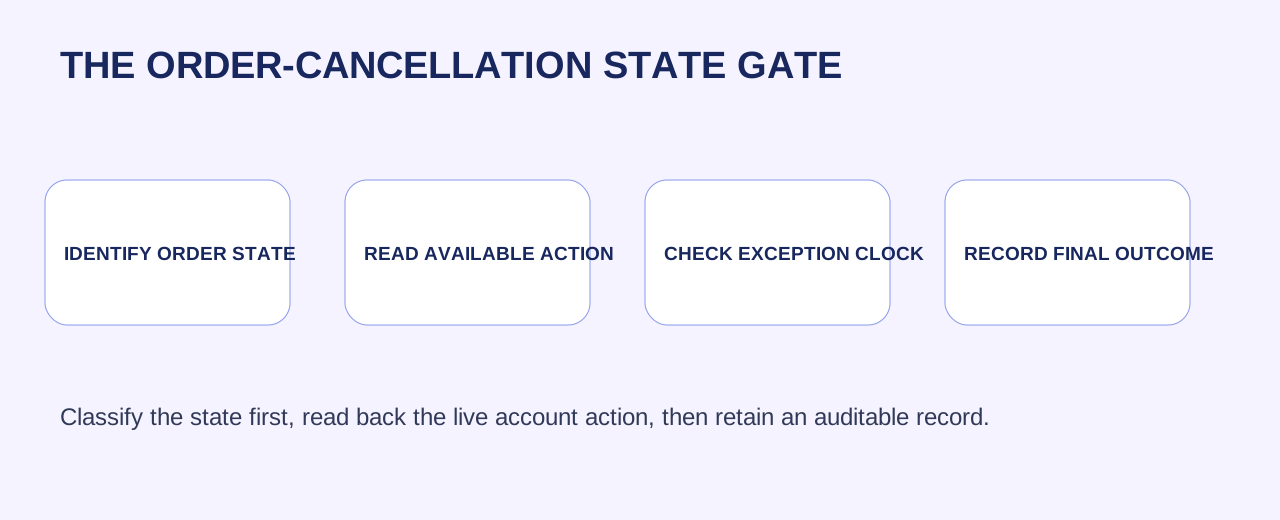
Start with a four-field intake record
For every request, record the order ID, current state, request timestamp and requested reason. Add the buyer message, item or SKU, fulfillment type, tracking or handoff evidence, owner and exact next review time. Do not copy unnecessary personal data into a separate spreadsheet. The record should let the next operator see what happened without reopening a chat thread or inferring from a status screenshot.
This intake separates facts from desired outcomes. “Customer changed their mind” is a request reason. “Awaiting Shipment” is an order state. “Cancel available” is a live account readback. A team that collapses those fields cannot tell whether it is resolving a customer request, trying to stop fulfillment, or documenting an exception.
Pending orders: act only after reading the live action
Pending can look simple because no shipment is visible, but the safe action still depends on the current case controls and payment or order processing status. Read the order’s available controls in Seller Center, record the action selected and confirm the resulting status after it completes. If an automatic refund-only pathway or a time-limited request is shown, capture that exact deadline rather than relying on a remembered policy summary.
Use one owner for the case and one readback field for the result. A click is not confirmation. The ledger closes only when the order state, refund or cancellation result and customer-facing follow-up are visible in the relevant system.
Awaiting Shipment: stop promises from outrunning fulfillment
Once an order is Awaiting Shipment, the question is no longer merely whether a buyer asked to cancel. The team must read whether a label has been generated, whether a warehouse handoff or carrier scan exists, and which action the live case permits. A warehouse can be processing a unit even while the customer-facing screen has not changed.
Create a short stop-check: live order state, label status, pick status, pack status, carrier acceptance, cancellation control, deadline and owner. If the order is already in a fulfillment exception path, the cancellation owner must coordinate with the warehouse rather than issue a blanket promise from support. Preserve the terminal status and any refund evidence.
Auction orders are a separate lane
Auction orders should never be silently dropped into the standard cancellation script. The approved plan specifically requires an auction lane because eligibility, buyer request handling and available resolution can differ by order type. Check the current auction order record and the policy-linked guidance available to that account before telling a customer what will happen.
Use a dedicated tag and review queue. Record auction status, buyer request, any seller or customer-service action available, time shown by the live case, evidence reviewed and final readback. If the account surface does not provide the necessary action, escalate with the order record rather than manufacturing an offline workaround.
Build a state-based owner map
A good cancellation control has three owners. Support owns accurate intake and customer communication. Fulfillment owns pick, pack, label and carrier evidence. The case owner owns the final platform action and result readback. Finance or operations should receive the final reconciliation record where refund and settlement impact must be checked.
The map prevents the two recurring mistakes: support cancelling something already moving, and a warehouse continuing to ship something that has reached a terminal cancellation result. Each handoff must state who is responsible, what evidence is required and when the case returns for review.
Review the queue as a control system, not an inbox
At the start and end of each operating day, review open cancellation requests by state, age, fulfillment handoff and owner. Separate requests awaiting a customer reply from requests awaiting a warehouse fact, a platform action or a final refund readback. The queue must reveal its oldest unresolved clock and its highest-risk handoff. A large total count is less useful than a precise view of what can still change before fulfillment becomes irreversible.
Use the review to find repeated causes. If the same SKU, warehouse lane, campaign message or customer expectation creates repeated cancellations, assign a prevention owner outside the case queue. The objective is not merely to close tickets faster. It is to remove the condition that makes the same request recur while keeping legitimate customer paths clear.
Make customer communication factual and reversible
A useful reply acknowledges the request, explains that the order is being checked and gives the next concrete update point. It does not assert that a cancellation or refund has occurred until the order record confirms it. Keep the customer message distinct from internal investigation: the buyer needs a clear next step, while the team needs evidence, timestamps and ownership. Review it before every handoff.
When the result is read back, send only the confirmed outcome and any required next action. This protects trust without creating a second promise that the team cannot support. If a case must be escalated, say that it is under review and retain the precise reason internally.
Use the smallest useful next action today
Open five recent requests and classify them only: Pending, Awaiting Shipment, auction or another visible state. For each, enter the four-field intake record, read the live allowed action, name the owner and set a review time. Do not mass-act from a spreadsheet. First identify where the team is losing the state, evidence or readback.
Then repair one failure mode. It might be a missing warehouse handoff timestamp, an unclear auction tag, a support macro that promises too much, or a ledger with no terminal-result field. One reliable state gate is more valuable than a larger queue processed with assumptions.
Source notes
This WEM operating framework is based on the complete current TikTok Shop U.S. Customer Order Cancellation, Return, and Refund Policy, revalidated October 26, 2026. Order states, eligibility, interface actions, clocks and auction handling can change; verify the live Seller Center case and readback before acting.
Related WEM guides
Frequently asked questions
Can every pending order be cancelled the same way?
No. Read the current order controls and displayed case status before acting.
What should support check for Awaiting Shipment?
Order state, label, pick and pack activity, carrier handoff, live cancellation control, deadline and owner.
Why use a separate auction queue?
Auction order handling can differ by order type. Preserve the live order and policy readback.
Is a cancellation click a completed case?
No. Close only after the visible terminal order result and relevant refund evidence are read back.
What belongs in the intake record?
Order ID, state, request timestamp, request reason, owner and a scheduled review time.
What is the smallest useful next step?
Classify five live requests and repair one missing state, evidence or readback field.