TIKTOK SHOP · BETA FIRST LOOK
TikTok Shop Growth Autopilot: The New 7-Day Ad Cycle Sellers Need to Understand
Wendy Lin · Sep 21, 2026 · 10 min read
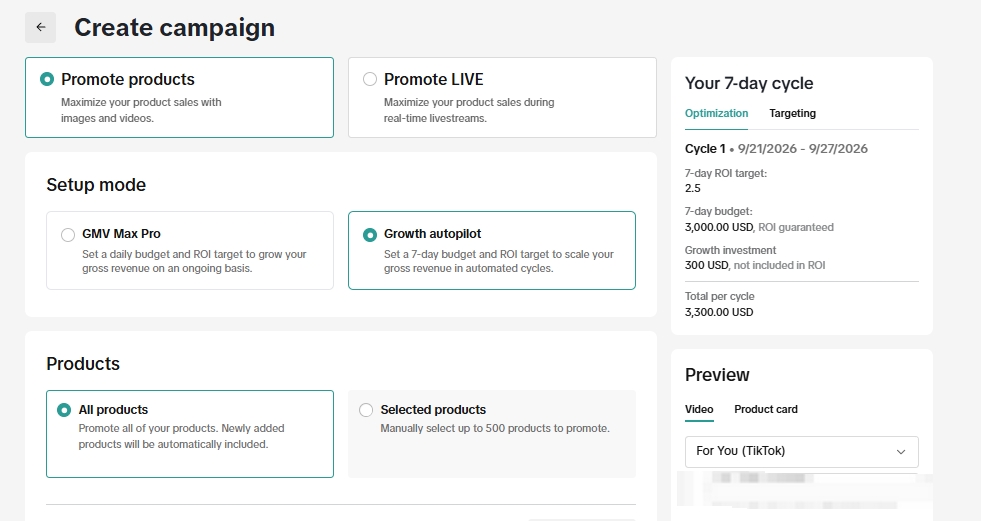
Growth Autopilot is a limited beta setup mode shown next to GMV Max Pro in a TikTok Shop campaign creation screen. In the screen we reviewed, a seller sets a seven-day budget and ROI target, then the campaign runs in automatic seven-day cycles. It also offers conditional protection at 90% of the ROI target and a separate, unprotected growth investment. This is a description of the beta interface we saw on September 21, 2026, not a promise that every shop has access or that the settings will stay the same.
The part that matters to me is the commitment. Many sellers look at a weak morning and immediately change the ROI target or cut the budget. Growth Autopilot asks the team to make the decision before the cycle starts and give the system a full week to work. That can be useful, but only if the product, margin, content, and inventory can support the test.
What changes compared with a regular GMV Max setup?
The visible distinction is the planning window. The GMV Max Pro card says to set a daily budget and ROI target for ongoing revenue growth. The Growth Autopilot card says to set a seven-day budget and ROI target for automated cycles. The screen offers Promote products or Promote LIVE at the top, but the selections and settings shown here are for Promote products. We cannot infer the LIVE version's rules from these product screenshots.
| Decision | What the beta screen shows | What it means for the operator |
|---|---|---|
| Product scope | All products, including newly added ones, or up to 500 selected products | Decide deliberately whether the system should see the whole catalog or a controlled group of SKUs. |
| Goal and budget | A seven-day ROI target and a seven-day budget | Set both from actual contribution economics before the cycle begins. |
| Recommendations | Different ROI suggestions with competitiveness and potential gross-revenue estimates | Treat estimates as planning prompts, not a sales forecast. |
| Growth investment | Separate $100, $200, or $300 pace options in this account | This is extra spend, charged as used, outside the campaign budget and outside ROI protection in the visible interface. |
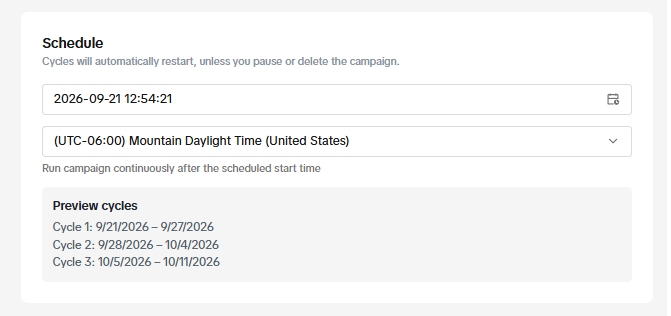
| Schedule | Consecutive seven-day cycles restart automatically unless the campaign is paused or deleted | Plan the next cycle in advance; check the current account's pause controls before launching. |
This builds on an existing automation foundation. TikTok's Product GMV Max overview says it can select creatives and optimize audience settings across paid and organic activity. GMV Max Pro is a broader solution pack involving affiliate costs, coupons, and platform commissions. Seeing the two setup modes side by side does not mean Growth Autopilot has all the GMV Max Pro components or that the two names are interchangeable.
If your shop does not have the beta, the immediate decision is still when your product and operation are ready for GMV Max. A new interface does not change the work required before paid distribution.
Read the 90% protection carefully
The beta screen says “90% of your ROI target is protected” and “No conversions required.” It says eligible campaigns receive an ad credit. The two conditions visible in the expanded panel are to let the campaign run for the full cycle and limit ROI edits to the first day of each cycle. It also says the campaign cannot be paused or terminated after a cycle's scheduled start time.
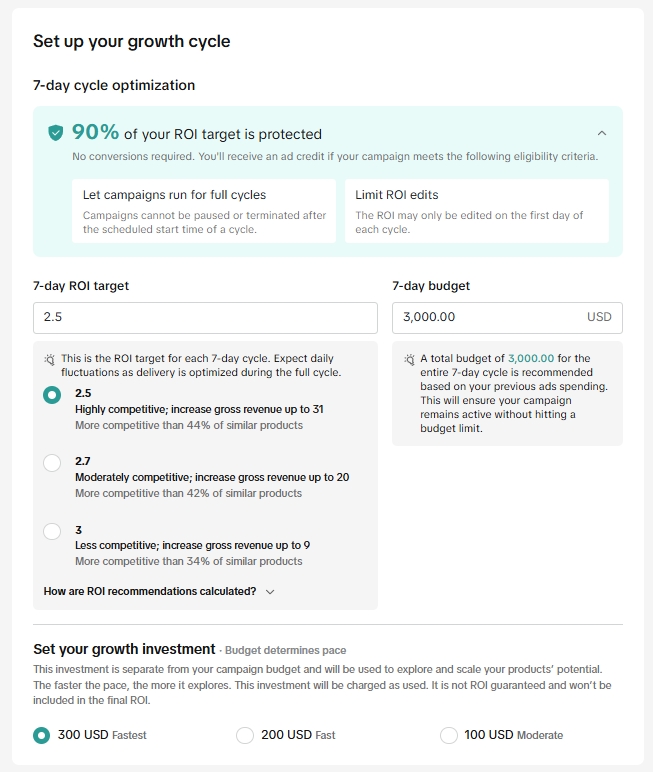
With a 2.5 ROI target, 90% of that target is 2.25. That is a threshold for the stated protection, not a guarantee that the campaign will deliver 2.5 ROI, produce a fixed amount of revenue, or pay a cash refund. The screen does not show the complete credit formula, the credit timing, or every disqualifying condition. I would get the account-specific terms from TikTok before treating the protection as part of a spending decision.
You may see posts claiming 100% ROI protection for Growth Autopilot. That is inconsistent with the 90% wording in this September 21 beta screen. It may reflect a different experiment or an earlier offer, but it should not be repeated as a universal rule. TikTok's public ROI protection documentation covers standard GMV Max, with daily calculations, a daily order requirement, and exclusions. Those standard conditions should not simply be copied onto this separate beta screen, which explicitly says no conversions are required.
The $300 line is easy to miss
In the example screen, the seven-day ad budget is $3,000, the selected growth investment is $300, and the right-hand summary says $3,300 total per cycle. The interface says the growth investment is separate from campaign budget, is charged as used, is not ROI guaranteed, and is not included in the final ROI. The three visible options are $100 (Moderate), $200 (Fast), and $300 (Fastest). These are examples from this account, not universal price tiers.
Here is a simple illustration, not a forecast. If the full $3,000 campaign budget were spent and attributed gross revenue were $7,500, the campaign-budget ratio would be 2.5. If the separate $300 were also fully spent, revenue divided by the $3,300 total would be about 2.27, before affiliate commissions, product cost, coupons, fulfillment, returns, and other costs. The actual accounting and protection calculation must be confirmed in the beta account. The important point is to set a ceiling for the entire cycle's possible spend, not just the protected line item.
There is another measurement trap. TikTok says Product GMV Max attributes orders from promoted products, including organic and affiliate orders, in its dashboard. That ROI helps manage the campaign, but by itself it does not prove every reported sale was caused by the ads. Review total shop sales and contribution alongside the campaign view.
Who can use Growth Autopilot right now?
This is a limited beta, not a generally available switch. Selected large shops and strategic seller accounts appear to have access; TikTok has not published a public Growth Autopilot eligibility threshold that I could verify as of September 21, 2026. An agency operator has also described access on a handful of major accounts. Your own Seller Center campaign creation screen and account representative are the practical access checks. Do not confuse this beta's availability with the broadly available Product GMV Max product.
What I would prepare before using it
First, pick the product scope. “All products” sounds convenient, but the screen says newly added products are automatically included. If a new SKU has thin margin, unclear claims, or insufficient inventory, that default matters. A selected-products test gives the team a clearer starting point.
Second, calculate the contribution left after product cost, affiliate commission, discounts, fulfillment, returns, and the full potential cycle spend. A platform ROI recommendation describes how competitive the setting may be; it cannot tell you whether that ROI leaves your business enough margin.
Third, check the content supply. Authorized creator videos, clear product demonstrations, credible proof, and a product page that answers objections give automation useful material to distribute. A seven-day budget cannot fix an offer that shoppers do not understand. Keep customer service and inventory ready if demand rises.
Finally, write down the decision for the next cycle before the current one ends: products, seven-day budget, ROI target, growth-investment option, and a stop or continue rule based on total contribution, not only the dashboard ROI. The visible beta conditions make mid-cycle changes costly to protection eligibility, so a team needs an owner and a calendar, not constant button pressing.
Source notes
Source note, checked September 21, 2026: The screenshots in this article are seller-provided beta interface evidence. Background and standard-product comparisons come from TikTok's Product GMV Max overview, GMV Max Pro overview, and standard GMV Max ROI protection article. The beta may change by account, market, or test cohort. This article reports setup options, not campaign results.
Frequently asked questions
Is Growth Autopilot available to every TikTok Shop seller?
No. The September 2026 interface and limited operator reports indicate selected beta access. TikTok has not published a public qualifying GMV or spend threshold for this mode. Check your own campaign creation screen.
Is Growth Autopilot the same as GMV Max Pro?
No. They are separate setup choices in the screen we reviewed. TikTok publicly describes GMV Max Pro as a solution pack with multiple growth components; the beta screen describes Growth Autopilot as an automated seven-day cycle.
Does 90% ROI protection mean TikTok guarantees sales?
No. The screen describes a conditional ad credit when the protection criteria are met. It does not promise sales, profit, cash reimbursement, or that every dollar of the cycle is protected. The separate growth investment is excluded from the visible guarantee.
Can I pause during a seven-day cycle?
The expanded beta panel says a campaign cannot be paused or terminated after the scheduled start time of a cycle while keeping the stated protection conditions. The schedule says cycles automatically restart unless paused or deleted. Confirm the exact controls and effects in your account before launching.
How should I evaluate the result?
Use the full cycle, then compare budget actually spent, attributed gross revenue, ad credits if any, growth-investment spend, total shop demand, and contribution after other costs. A beta dashboard ROI alone is not a profit or incrementality study.