Audit Every TikTok Shop BFCM Price Claim Across Video, LIVE and Product Page
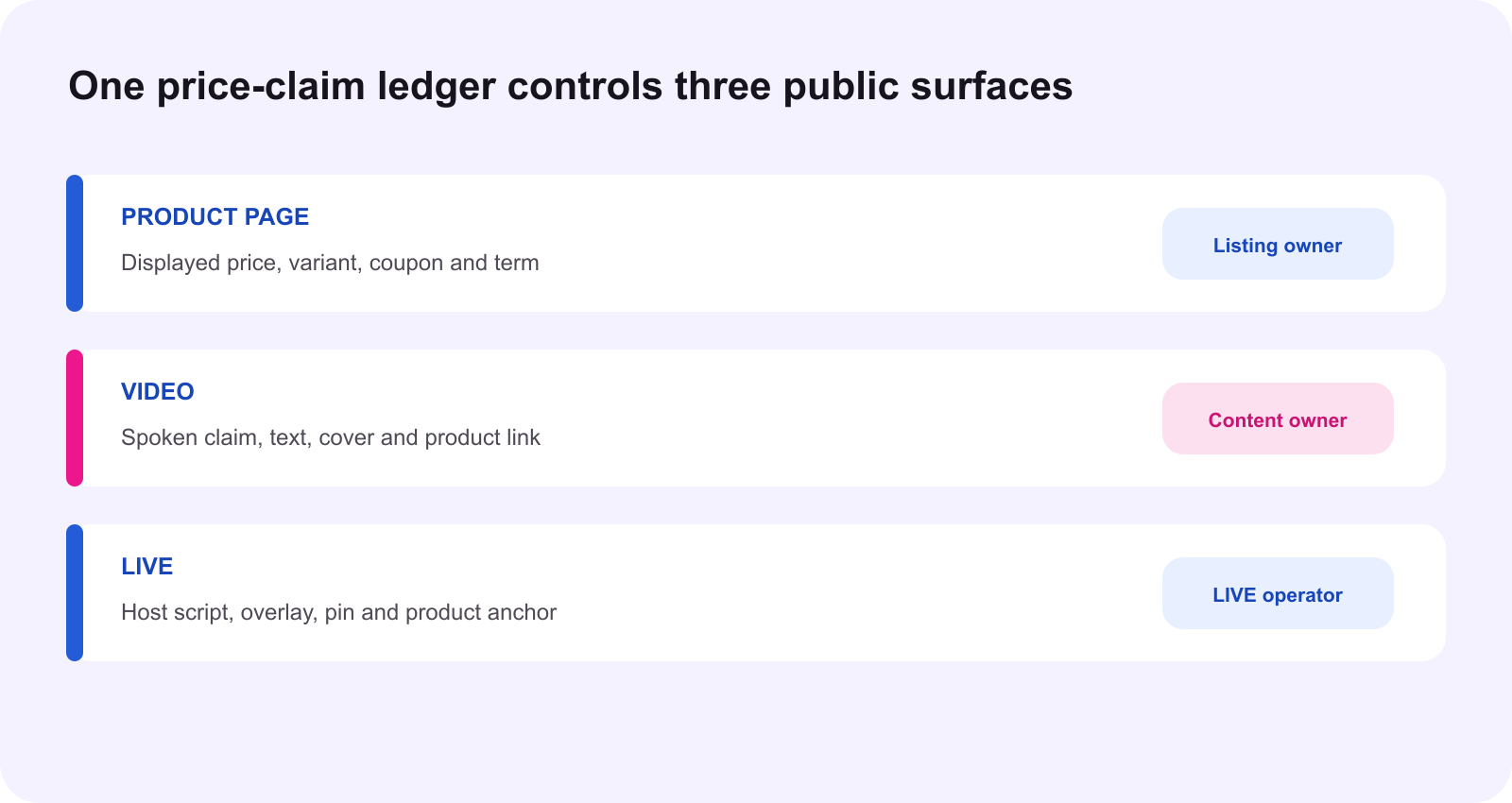
One ledger must connect the number a seller configures, the number a shopper sees and the words a creator publishes.
Direct answer: do not approve a BFCM price claim by checking only the campaign screen, the product page or the creator script. Approve it only when one time-stamped ledger connects the exact SKU, active promotion layers, shopper conditions, product link, spoken wording, on-screen text and expiration action across the product page, video and LIVE. The seller's campaign price is an input. The viewer-facing claim is a separate release decision.
This distinction matters because TikTok Shop's current campaign guidance separates the Campaign Price Range, the Campaign Sale Price and the Estimated Campaign Price. Promotions in the same layer may compete by priority, while allowed promotions in different layers may stack. A creator can therefore repeat a real number from one screen and still mislead a shopper if the SKU, coupon, eligibility, timing or checkout path differs.
Start with four different price objects
Retail or listing price is the product's reference selling price. Campaign sale price is the value submitted for campaign participation and must stay within the campaign's permitted range. Estimated campaign price is the predicted shopper price after currently configured promotion layers. Published claim price is what the creator says, shows or implies to a viewer. These values can match, but the team should never assume they do.
The Campaign Price Transparency guide explains that multiple threshold rules can apply at once and the strictest requirement determines the upper threshold. It also describes product-level, cart-level and coupon layers. Within the same layer, the strongest applicable discount can win; when promotion types cannot stack, system priority applies; compatible promotions across different layers can combine. The price forecast and breakdown are planning tools, not permission to promise that every viewer will receive one universal checkout result.
The 2026 BFCM Better Price Rewards guide adds a seasonal registration model: sellers enter one price in a unified flow and the system assigns the matching benefit tier. Registration is product-level by SKU, products may use different tiers, and the lowest tier may apply across SKUs when a product's SKU tiers differ. This makes SKU identity part of the claim, not an administrative footnote.
The minimum price-claim ledger
| Field | Release evidence | Owner |
|---|---|---|
| Product identity | Product ID, exact SKU, variant, bundle and bound link | Listing |
| Seller input | Retail price, campaign sale price and registration tier | Campaign |
| Shopper path | Showcase price, active coupon, stacking breakdown and time window | Campaign |
| Claim | Exact spoken words, subtitle, overlay, cover and pinned text | Content or LIVE |
| Conditions | SKU, coupon, bundle, minimum spend, eligibility, shipping, tax and region | Release owner |
| Evidence time | Last verified timestamp, screenshot or export and reviewer | Release owner |
| Kill action | Pause, edit, unlink, remove or replace when a trigger changes | Named operator |
A ledger row belongs to one claim on one asset. Do not store a generic “BFCM price approved” note for an entire catalog. A short video with a fixed subtitle needs a different expiration action from a LIVE host script that can be corrected immediately. The product page may update automatically while a saved creative remains unchanged.
Audit the product page first
Open the exact bound product path as a shopper. Confirm the product title, image, variant, package quantity and current displayed price. Then read the coupon, minimum spend, eligible user, promotion period, shipping and tax conditions. Record whether the price is available before checkout, only after clipping a coupon, only for a selected SKU or only for a specific account type.
Next, review Campaign management and the price breakdown. Save the Campaign Sale Price and Estimated Campaign Price separately. If a product has several SKUs, test the SKU used in the content instead of relying on a range. A range can hide that the hero variant uses a higher price or a lower benefit tier.
Audit every video claim as a durable asset
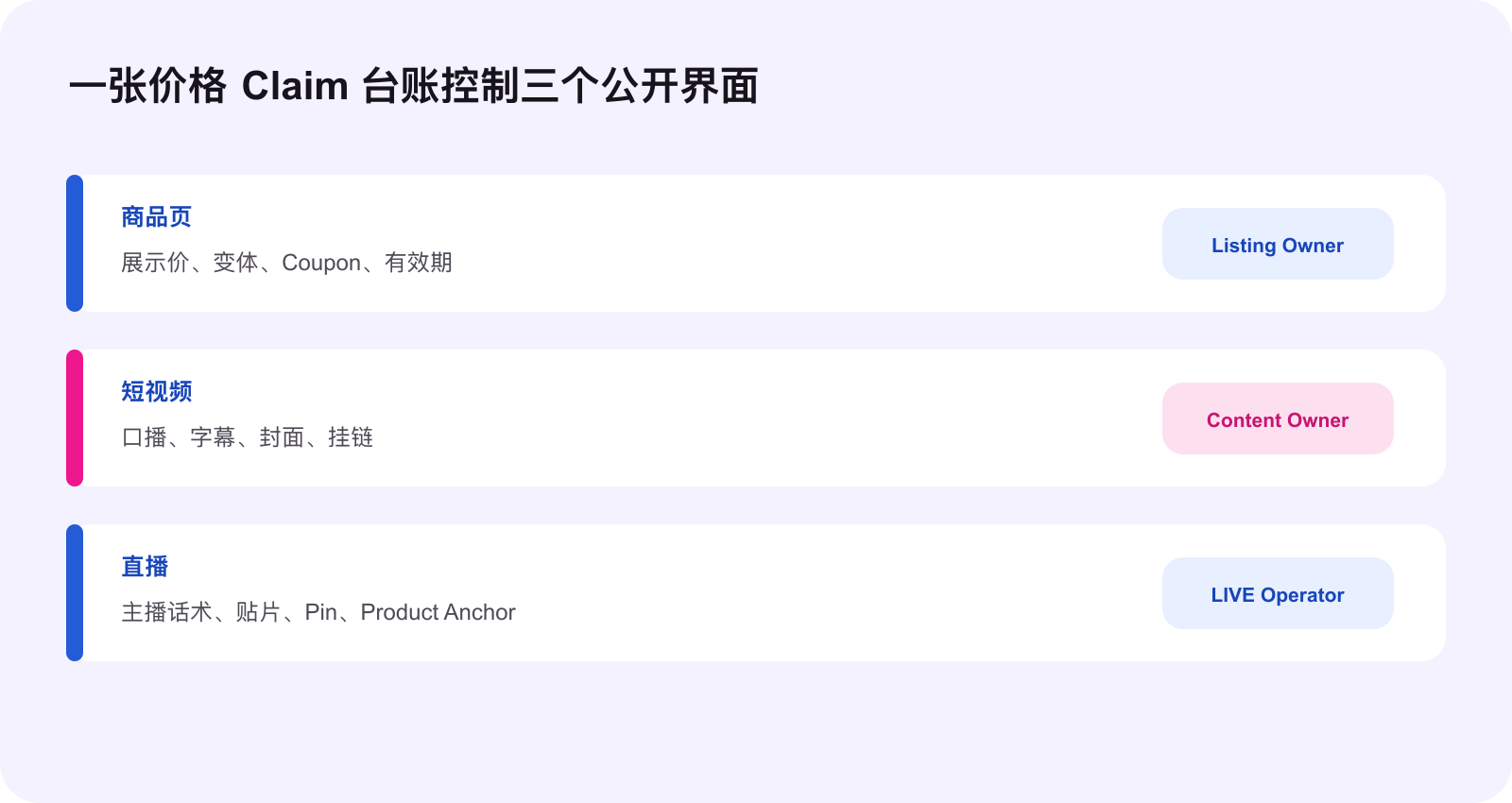
List every price signal a viewer can encounter: spoken price, burned-in subtitle, sticker, caption, cover, comment, product anchor and shopping-page recording. The Content Policy applies across formats, including spoken statements, onscreen text, images, titles, links and demonstrations. One accurate caption cannot cure an inaccurate voiceover.
For a specific price, compare the wording with the showcase price at posting time. If a lower amount depends on an active coupon, selected SKU or promotion, state the material condition. Avoid turning “some eligible viewers may receive a coupon” into “everyone gets this for $9.99.” If the content is scheduled before the offer activates, treat preheat as not active and do not claim current availability.
Audit LIVE as a changing system
A LIVE price claim is not only the host's sentence. It includes the pinned product, overlay, moderator response, coupon instruction and the product path opened by the viewer. Before the room starts, the operator reads back the approved ledger row. During the room, the operator watches for coupon depletion, SKU changes, campaign status, product-link swaps and expired urgency language.
Use two script modes. The exact-price mode is allowed only while the time-stamped conditions still match. The fallback mode avoids a fixed number and directs viewers to check the current product page, selected SKU and available coupon. The operator must be able to switch modes without waiting for a brand meeting.
Install a kill switch before publishing
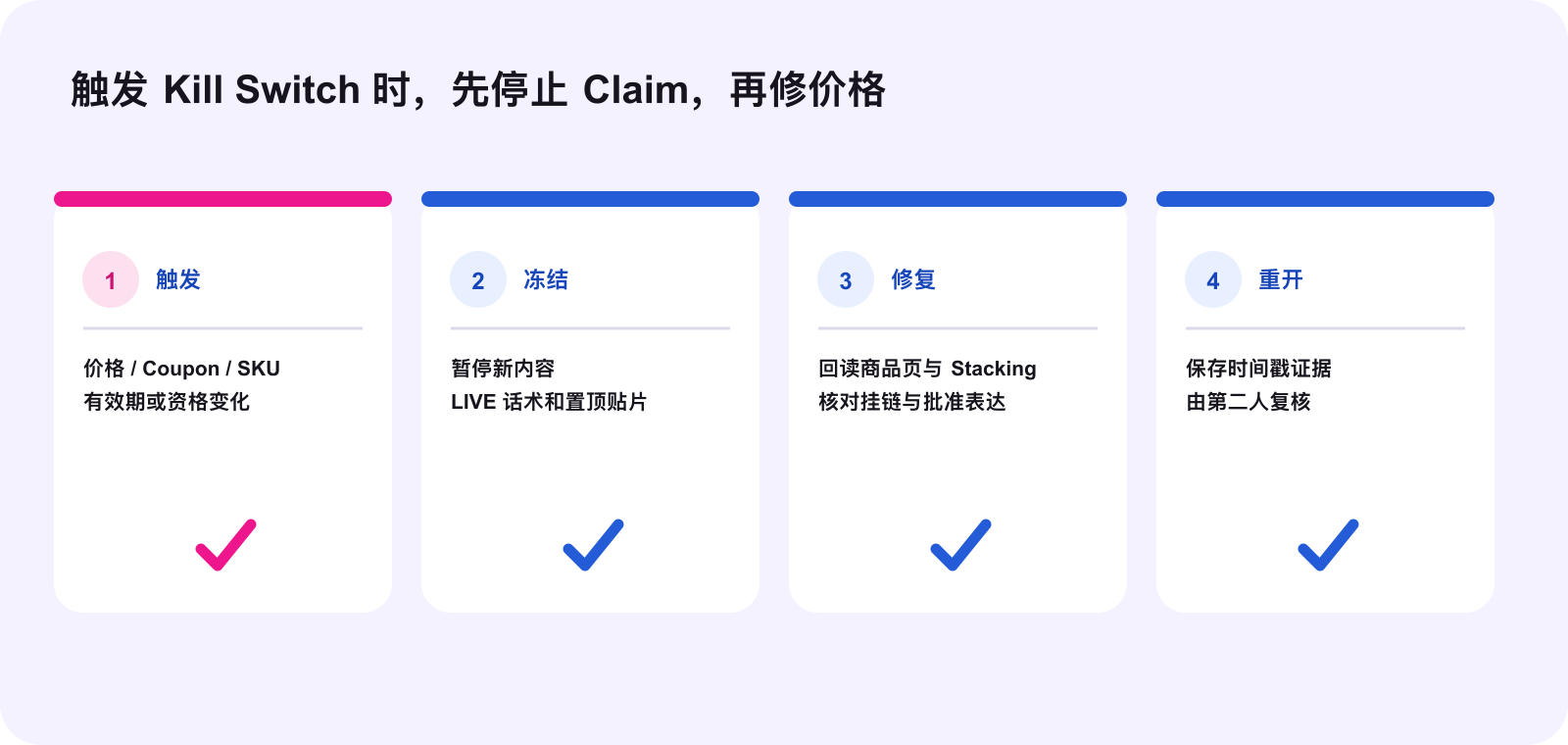
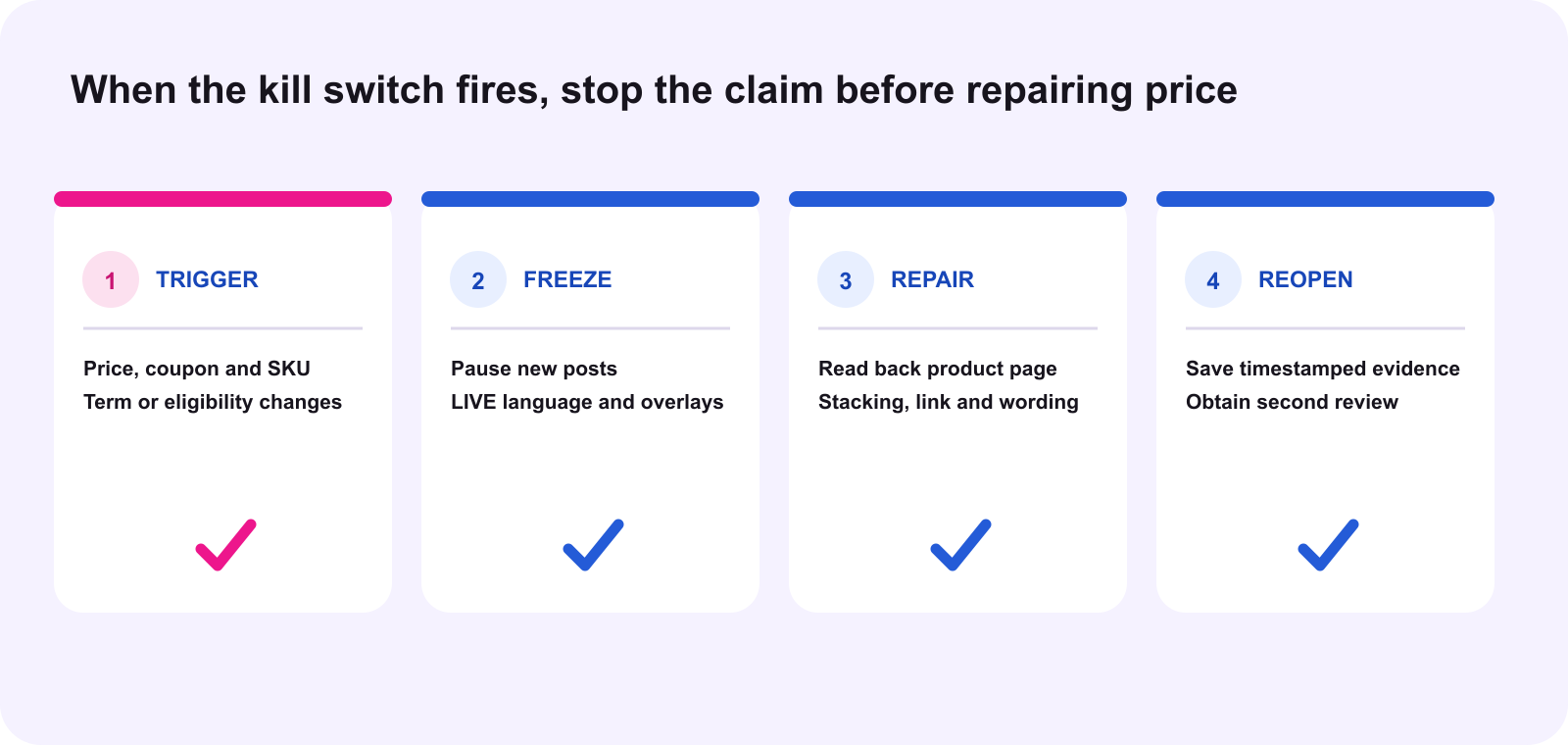
Trigger the kill switch when any material field changes: price, coupon amount, coupon availability, selected SKU, bundle quantity, minimum spend, user eligibility, promotion period, campaign participation, product link, shipping treatment or tax treatment. It should also fire when the team cannot reproduce the approved path from a clean shopper view.
The sequence is simple: freeze the affected claim, identify every surface that repeats it, repair the price path or replace the wording, and require a second-person readback before reopening. For videos, that can mean editing, unlinking, removing or stopping promotion where controls allow. For LIVE, it means stopping the exact-price line and pinned overlay immediately. For the product page, it means correcting the offer or removing the unsupported comparison.
Release sequence for BFCM
- Freeze the exact product ID, SKU, bundle and campaign window.
- Record retail, campaign sale and estimated shopper prices as separate fields.
- Capture the active promotion breakdown and every condition.
- Inventory all product-page, video and LIVE claim locations.
- Classify each claim as exact, conditional or general.
- Approve the precise wording and its expiration action.
- Perform a posting-time or pre-LIVE readback from the bound product path.
- Monitor triggers and execute the kill switch without delay.
Operational example: a BFCM beauty bundle
Assume a brand registers a four-piece bundle at a campaign sale price of $32. A seller coupon may reduce the estimated price to $27 for eligible users, while one video is scheduled during preheat. The approved video should not say “everyone gets it for $27 today.” Before activation it can describe the upcoming BFCM event without promising availability. After activation, a specific claim must identify the bundle and coupon condition, or use flexible language directing viewers to the current product page.
If the coupon runs out during a LIVE, the operator switches to fallback language, removes the $27 overlay and updates the pinned explanation. The $32 campaign price may still be valid, but the $27 claim is no longer approved. This is a WEM operating example, not a claim that every account uses the same tools, tier or price.
The smallest useful action today
Choose one priority BFCM SKU and make one ledger row. Open the product as a shopper, record the current showcase price and conditions, compare it with the campaign sale and estimated campaign prices, then paste every planned video and LIVE price phrase into the row. Assign one kill-switch owner. If the owner cannot explain which phrase stops when one coupon changes, the claim is not ready.
Source notes and execution boundary
This original WE Marketing operating framework draws on the complete current TikTok Shop U.S. Seller University Content Policy dated October 9, 2026, Price and Discount Content Claims Guide dated July 16, 2026, Campaign Price Transparency dated March 2, 2026, and 2026 BFCM Better Price Rewards Registration Guide dated September 29, 2026, all revalidated October 10, 2026. Platform interfaces, eligibility, campaign tiers, stacking, prices, coupons and enforcement can change. Verify the current U.S. Seller Center, creator tools and shopper path before execution. This framework does not guarantee campaign eligibility, benefits, distribution, sales or policy approval.
Common questions
Which TikTok Shop price should a creator mention during BFCM?
Use a price that is active, current and reasonably available through the bound product path. The showcase price at binding or posting is the safest specific reference unless a lower price is supported by an active coupon, selected SKU or promotion and the key conditions are disclosed.
Is campaign sale price the same as the final shopper price?
Not necessarily. Campaign sale price is the price submitted for campaign participation. The estimated shopper price may be lower after permitted product, cart-level or coupon discounts, and an individual shopper may see different conditions.
Can a video say lowest price or cheapest during BFCM?
Only if the claim is accurate and supported. TikTok Shop policy identifies unsupported superlatives such as lowest or cheapest as risky or prohibited. A safer default is to describe the current offer and direct viewers to the product page for the latest price and eligibility.
Can creators promote a BFCM price during preheat?
Do not tell viewers they can obtain a scheduled price while it is still in preview or preheat. Publish an availability claim only after the offer is active, or describe the upcoming event without presenting the future price as currently obtainable.
What should trigger the BFCM price-claim kill switch?
Trigger it when price, coupon, eligible SKU, bundle, minimum spend, user eligibility, timing, shipping, tax treatment, product link or campaign participation no longer matches the approved claim. Pause the affected asset or LIVE language before rebuilding the claim.
Who owns the cross-surface price audit?
Assign one release owner with authority to stop publishing. Listing, campaign, content and LIVE owners provide evidence, but one named operator should maintain the ledger, time-stamp the readback and confirm that every public surface uses the approved version.