TIKTOK SHOP U.S. · PRODUCT LISTING OPERATIONS
AI Product Images on TikTok Shop: Keep Every Visual Tied to the Real SKU
Direct answer: AI may change the scene, not the product truth
Direct answer: Use AI product images only after you can tie every visible claim back to the specific SKU a shopper can buy. The current TikTok Shop U.S. requirement addresses specification consistency, fake 3D, scale, substituted main objects, SKU or bundle counts, attributes and unsupported effects. An attractive image is not evidence that the pictured item, quantity, material, dimensions, compatibility or outcome is accurate.
Make the real SKU record the control surface. Before any generated, rendered or edited image is approved, compare it with the current product title, selected variation, attribute fields, package contents, dimensions and supported use. If the visual cannot survive that readback, hold it. This is an operating gate, not a prompt-writing exercise.
Start with one versioned source of truth
Create a small SKU image record before production: Product ID, variation ID, exact shopper-facing title, hero-photo reference, material, dimensions, volume or capacity, compatible devices or surfaces, included parts, count, bundle status, current attribute screenshot and checked time. Assign a listing owner. This record does not replace Seller Center; it makes the evidence needed for review visible to the team.
Do not use a product-family photo to approve every variation. A color, size, pack count or accessory difference is a different shopper promise. If a generated image shows an item that looks like one variation while the purchase selector defaults to another, fix the route or remove the image.
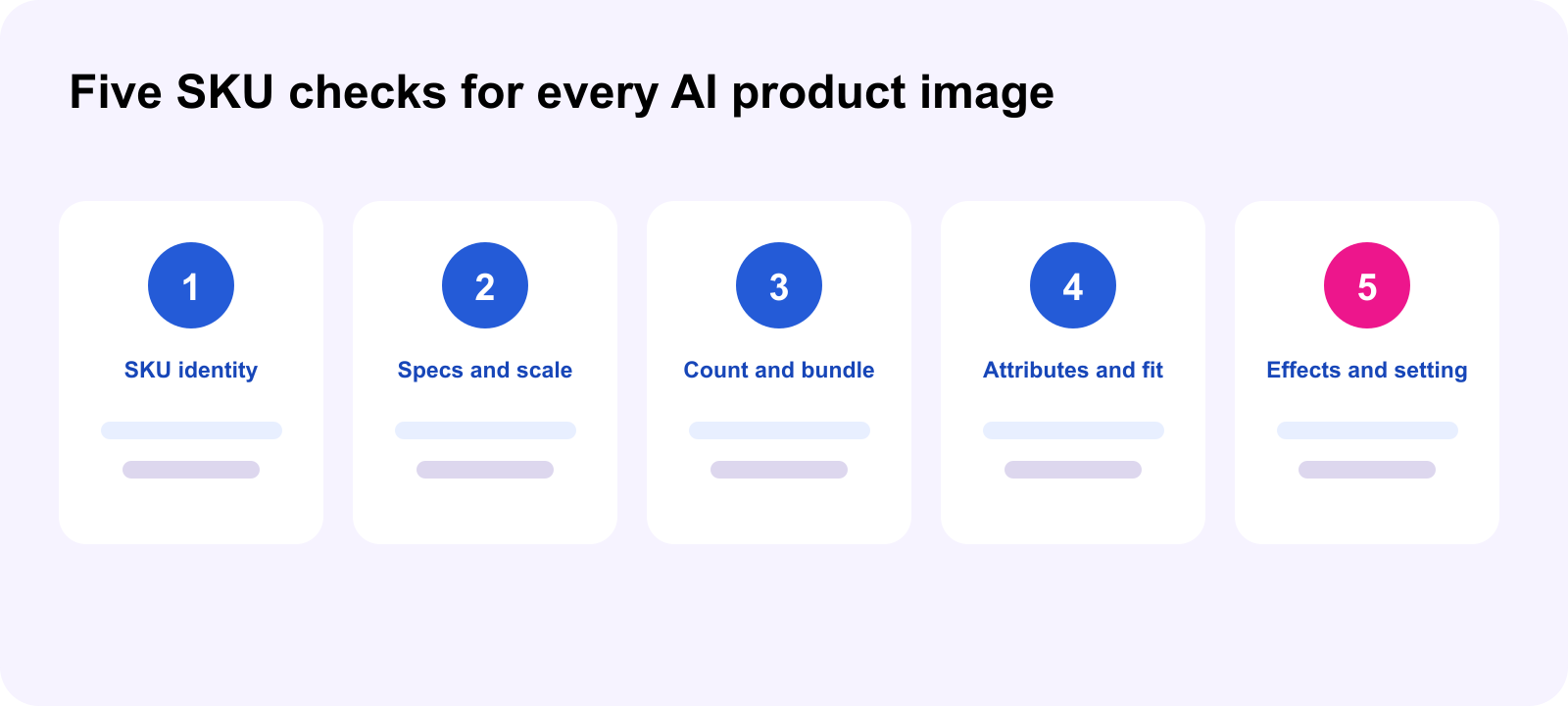
Run five checks before upload
Identity: the actual sold item stays the main subject. Do not replace a toy, decoration or accessory with a real animal, person or unrelated lifestyle object that makes the offer unclear.
Specifications and scale: compare visual thickness, dimensions, volume and reference objects against the product record. A perspective trick that makes a small item look large is still a misleading shopper impression.
Quantity and bundle: count what is shown. The product image, SKU option, title and description should tell one story. Do not duplicate pieces, show a bundle when items are separate, or borrow a different SKU’s image.
Attributes and compatibility: material, length, density, device fit and included parts must match the selected SKU. A beautiful car, device or room scene cannot imply compatibility the product attributes do not support.
Effects: do not add motion, glow, lighting, transformation or performance results that the real product cannot provide. Treat a visually impressive effect as a claim requiring evidence, not as harmless decoration.
Separate a creative edit from a product change
Background cleanup, lighting correction and crop work may be useful, but the approval question remains the same: did the edit change what a reasonable shopper thinks they will receive? Keep the original photo, generation input, output version, linked SKU, reviewer, outcome and timestamp in an image ledger. Mark the outcome as approved, revise or hold. Do not bury a rejected version in a shared asset folder where it can be picked later.
Use a release sequence with an owner and readback
First, the listing owner freezes the SKU facts. Second, the image producer labels the exact variation and image version. Third, a reviewer compares the image to the record, not to memory. Fourth, publish only the approved file. Finally, reopen the live PDP on desktop and mobile, select the intended SKU and capture the visible image, count and attributes. A successful upload is not a completed release until the buyer-facing readback agrees.
Smallest useful next action
Choose one high-traffic SKU today. Save its current hero image and attribute record, then audit every AI-assisted visual against identity, scale, count, attributes and effects. Put one owner and one next readback time on every mismatch. Do not expand to the catalog until one SKU’s images, selected variation and PDP facts agree without inference.
Source notes
Primary source: TikTok Shop U.S., AI-Generated Content Restrictions and Requirements for Product Listings Images, revalidated September 30, 2026. It covers product-specification consistency, fake 3D, scale, substituted main objects, SKU/bundle/count accuracy, attributes and unsupported effects. Platform controls and enforcement may change; verify the current Seller Center and policy view before release. The SKU record, five-check audit and image ledger are WEM operating guidance.
Frequently asked questions
Can AI product images use a new background?
Possibly, but it must not change the shopper understanding of the product, size, included items or capability.
Can one image serve every variation?
Only if the shopper facts match every variation. Review each difference separately.
Can an image show extra pieces?
Not when the buyer will not receive that quantity or bundle.
Is an AI effect a product claim?
When it implies function, motion, result or capability, review it as a claim requiring evidence.
Do we need a readback after approval?
Yes. Select the intended SKU on the live PDP and verify the buyer-facing image and attributes.
What happens to a rejected asset?
Keep the reason and version record, revise it, and prevent the old file from being reused.