WE Marketing · TikTok Shop U.S. · Promotion Operations
TikTok Shop Discount Architecture: Stop Stacking Offers Without a Plan
By the WE Marketing Team · Published July 29, 2026
Build one controlled final customer price
A TikTok Shop discount architecture is the operating plan that defines the job, audience, funding source, margin floor, time window, inventory limit, and owner for every offer before it goes live. The goal is not to avoid stacking. The goal is to know the final customer price and seller-funded cost before creators, ads, LIVE, and campaigns amplify it.
TikTok Shop gives U.S. sellers several ways to create value: Product Discount, Flash Sale, coupons, shipping support, quantity offers, campaign pricing, LIVE tools, and TikTok-funded promotions. That flexibility can help a strong product convert. It can also make a team lose control of price, margin, and customer expectations when tools are activated by different owners.
The practical answer is to build the customer price from the bottom up. Start with a protected economics floor. Assign one conversion job to each layer. Simulate the exact combination in Seller Center. Test the customer experience on the surface where the offer will appear. Then publish only the combinations that have a named owner, stock limit, start and end time, and stop rule.
This is a WEM operating framework, not a promise that every promotion type will always stack in the same way. TikTok Shop's current U.S. Promotion Stacking Rules guide says that not all promotions can be used simultaneously and directs sellers to the Promotion Simulator to see what applies across discount layers and which offer takes priority. Account controls, campaign terms, funding, and eligibility can change. Treat the live simulator, current campaign page, and order settlement as the final account-level evidence.
The expensive mistake is managing tools instead of one customer price
A Product Discount may be created by ecommerce. A coupon may come from CRM. A LIVE offer may be requested by the host. A campaign price may be registered by growth. A creator may mention an offer that was valid when the brief was written. Each action can be reasonable by itself. The customer, however, sees one checkout total.
That is why a promotion calendar is not enough. A calendar shows when offers run. Discount architecture shows how the layers interact and who pays for the result.
Before approving any offer, write down:
- regular customer-facing price and the evidence supporting it
- direct product or SKU discount
- coupon or order-level condition
- quantity incentive, shipping support, or campaign layer
- TikTok-funded amount when it is actually confirmed
- affiliate commission and any paid-media cost that still applies
- expected units, inventory reserved, and fulfillment capacity
- final simulated customer price
- seller-funded discount per order
- contribution after product cost, fulfillment, returns reserve, commission, and media
If the team cannot complete this one-row calculation, it is not ready to publish the offer. A platform alert can catch some extreme cases, but it cannot know your landed cost, return profile, creator agreement, or cash-flow constraint.
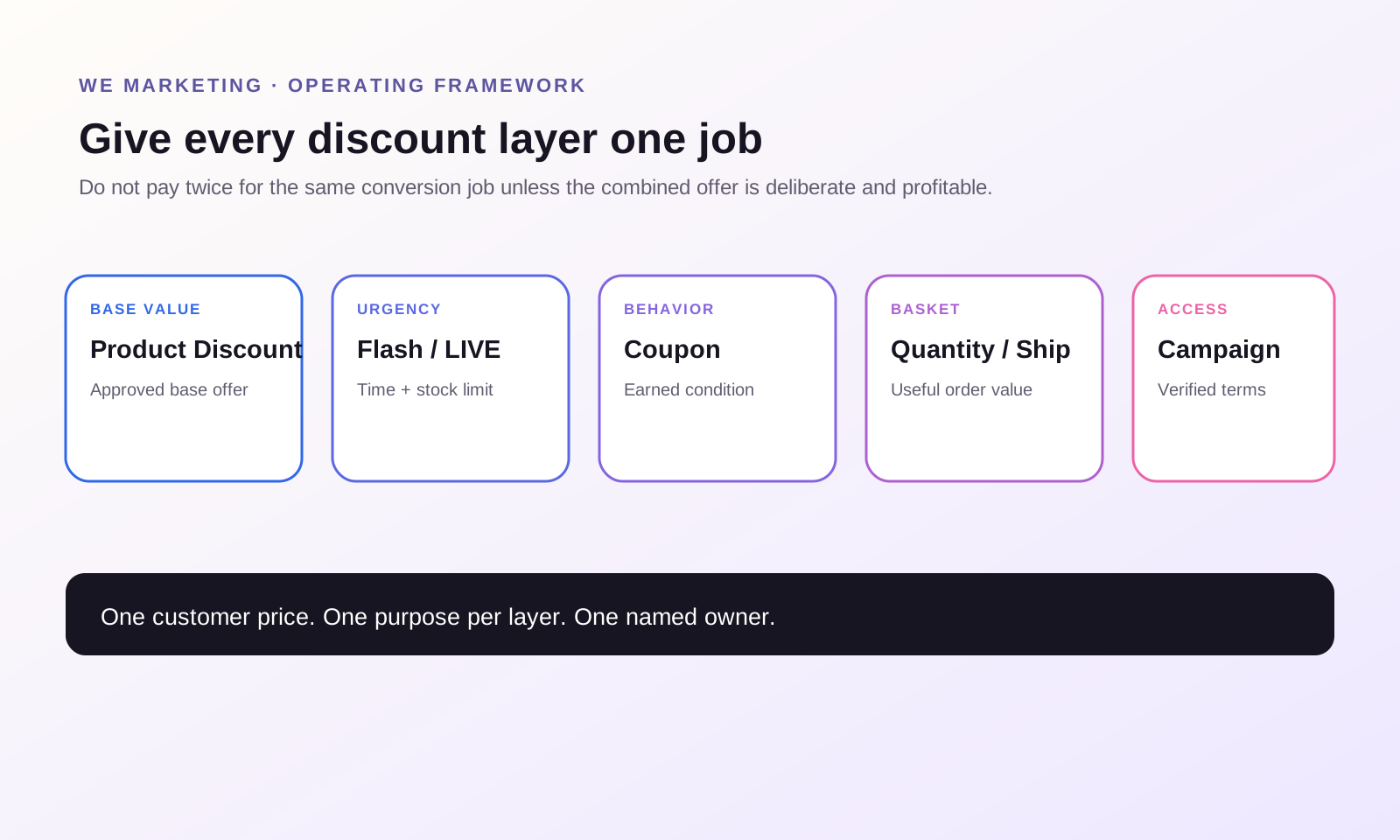
Give every discount layer one clear job
Discounts work better when each layer has a specific operating purpose.
| Layer | Useful job | Wrong reason to use it | Owner question |
|---|---|---|---|
| Product Discount | Create a visible base offer for a product or selected SKU | Keep a permanent crossed-out price without a real price strategy | What is the approved base promotional price and end date? |
| Flash Sale or LIVE offer | Create a short, inventory-limited urgency moment | Rescue weak content or an unclear product page | Which event, channel, stock pool, and stop time does this serve? |
| Coupon | Reward a defined cart, customer, or channel behavior | Add another percentage because conversion looks soft | What behavior must the shopper complete to earn it? |
| Quantity offer | Increase useful basket size | Force extra units of a low-repeat or high-return product | Does the extra unit create customer value and healthy contribution? |
| Shipping support | Remove a delivery-cost barrier | Hide weak unit economics in every order | What basket threshold protects the economics? |
| Campaign or TikTok-funded layer | Access a defined event or platform-supported customer value | Assume platform funding will cover an unverified gap | What is confirmed in the live campaign terms and settlement? |
One offer can perform more than one job, but a team should still name the primary one. If a Product Discount already makes the hero SKU competitive, a broad coupon may be unnecessary. If a LIVE Flash Sale is the conversion moment, use inventory limits and a precise window instead of leaving a deep storewide discount running around it.
The principle is simple: do not pay twice for the same conversion job unless the combined offer is deliberate and profitable.
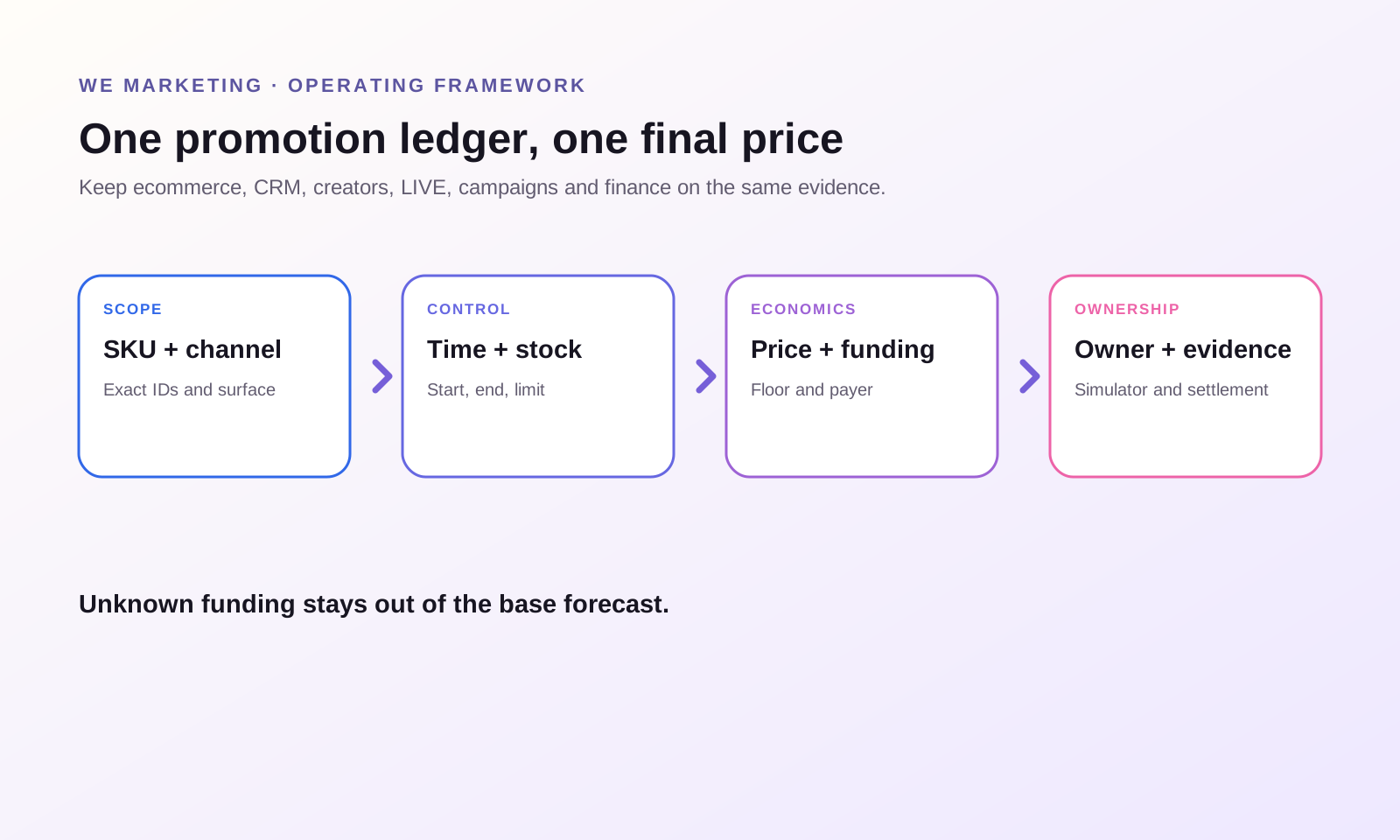
Build a promotion ledger before touching Seller Center
WEM recommends one shared ledger for every active or scheduled offer. The minimum fields are:
| Field | What the team records |
|---|---|
| Offer ID | A unique internal name that appears in the brief, calendar, and review |
| SKU scope | Exact product and variation IDs, not only a product nickname |
| Customer job | Trial, urgency, basket growth, retention, campaign access, or another specific job |
| Channel | Product page, Shop, creator video, LIVE, CRM, or campaign |
| Funding | Seller-funded, TikTok-funded, co-funded, or unconfirmed |
| Time | Start, end, time zone, and cutoff for creator communication |
| Stock | Sellable stock, reserved stock, purchase limit, and stop threshold |
| Price | Regular price, each discount layer, simulated final price, and seller-funded amount |
| Economics | Contribution floor and estimated contribution after variable costs |
| Owner | Person who can publish, pause, communicate, and reconcile settlement |
| Evidence | Simulator screenshot, campaign terms, test cart, and post-order settlement |
The ledger should be reviewed before the offer is mentioned in a creator brief. Creators can drive demand after an old offer has ended, or repeat a price that only applied in one channel. Give them the exact SKU, value statement, eligibility condition, and end time. If the price can vary by customer or platform funding, describe the condition rather than promising one universal total.
For a LIVE, connect the ledger to the run of show. The host needs to know which product is active, when the offer starts, the purchase limit, remaining stock, and what to say when it ends. Customer service needs the same information so a screenshot of a prior price does not become an avoidable escalation.
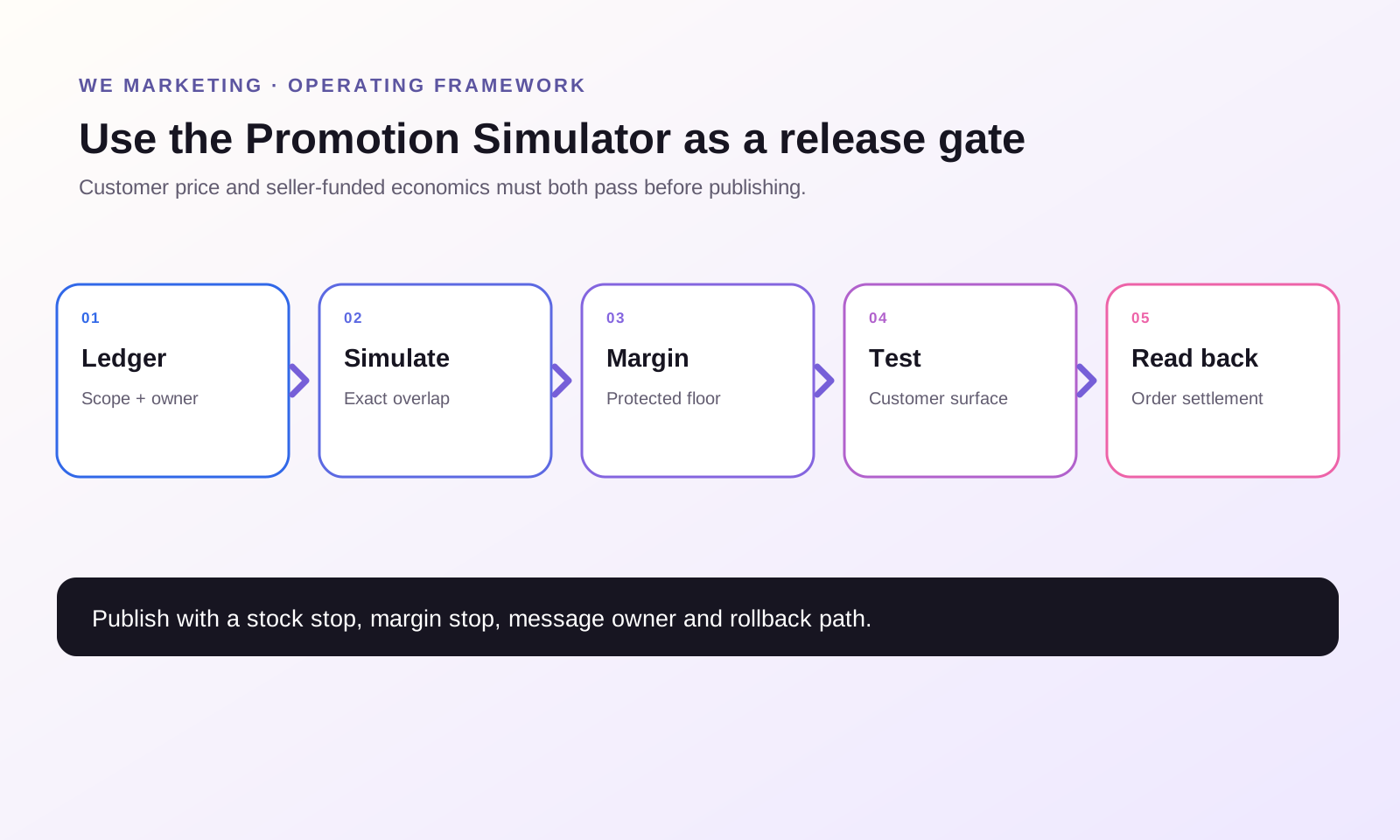
Use the Promotion Simulator as a release gate
TikTok Shop's U.S. stacking guide points sellers to the Promotion Simulator because different layers may stack or take priority. Product Discount guidance also describes a stacking details view and a real-time alert when combined promotions produce a very deep total discount. Those tools are useful, but the safe operating sequence goes further.
1. Simulate the exact SKU and exact time window
Do not test only the product level when variations have different prices, costs, or stock. Use the intended SKU, customer conditions, and overlapping schedule. Save the result with a timestamp.
2. Compare simulated price with the internal floor
The simulator answers what the customer may pay. Your margin model answers whether the seller can afford it. Add commission, fulfillment, expected returns, payment or program fees, and any paid traffic that will still run.
3. Test the actual customer surface
Check the product detail page, cart, LIVE bag, or campaign surface relevant to the offer. Confirm the correct product, price message, eligibility condition, purchase limit, shipping expectation, and end time. A correct back-office setup can still become confusing customer communication.
4. Publish with a stop rule
Examples of stop rules include a stock floor, a contribution floor, a maximum seller-funded amount, a customer-service error threshold, or a campaign cutoff. The owner must know who has authority to pause the offer and how creators or hosts will be updated.
5. Reconcile a real order
After launch, inspect a real order and its settlement breakdown. Confirm the customer paid the expected amount and that seller-funded and TikTok-funded portions match the plan. Do this early enough to stop an error before volume grows.
Separate seller-funded value from TikTok-funded value
TikTok Shop's current U.S. TikTok-funded Promotions guide distinguishes platform-funded customer discounts from seller promotions and explains that funding can appear across product pages, LIVE shopping bags, showcases, carts, and other surfaces. It also documents current stacking boundaries for specific LIVE and platform incentive combinations.
The safe lesson is not to memorize one permanent stacking matrix. It is to label funding for every active offer.
Use three statuses:
- confirmed seller-funded
- confirmed TikTok-funded or co-funded, with current campaign evidence
- unconfirmed, excluded from the forecast until verified
An exciting customer price can still be healthy when the platform funds part of it. The same customer price can be unprofitable when the seller silently funds every layer. Never build the internal P&L from the badge a shopper sees. Use campaign terms and settlement evidence.
When a platform-funded incentive appears unexpectedly, treat it as incremental customer value, not permission to deepen the seller discount automatically. First confirm whether it stacks, which product and audience it covers, and how long it applies.
Protect price integrity and future campaign flexibility
Deep discounting affects more than today's order. TikTok Shop's current Product Discount and Flash Sale materials connect visible promotional pricing to historical prices and customer-trust safeguards. Flash Sale and campaign pages may apply recent-price requirements. Exact windows and thresholds vary by tool or campaign, so sellers should use the current registration page as the final rule.
That makes price history an operating asset. A careless long-running discount can reduce the room available for a later event. Artificial list prices can prevent expected strikethrough presentation and weaken trust. A short-term conversion lift is not valuable if it trains shoppers to wait, compresses contribution, or blocks the next important campaign price.
Maintain a price-history view by SKU:
- regular transacted price
- seller promotional price
- campaign price
- lowest relevant price shown in the live registration tool
- start and end dates
- units, conversion, contribution, returns, and new-customer share
Use that history when planning the next 30, 60, or 90 days. Decide which moments deserve urgency and which products should hold price. A hero SKU may use a narrow trial offer while a bundle creates basket value. A replenishable product may use targeted retention value instead of another public markdown.
Review promotion performance as an operating system
GMV alone cannot tell you whether the architecture worked. Review the customer job, economics, and downstream behavior.
For trial offers, inspect new-customer share, first-order contribution, repeat behavior, and returns. For urgency offers, inspect sell-through within the planned window, cancellation, stockouts, and whether the traffic lifted other products. For basket offers, inspect units per order, attachment, fulfillment errors, and contribution. For creator or LIVE offers, inspect content performance, product clicks, conversion, commission, offer cost, and customer questions together.
Use one weekly review:
1. Which promotion combinations were actually live? 2. Which final prices did customers receive? 3. How much did the seller fund, and how much was externally funded? 4. Which SKUs reached the contribution or stock stop threshold? 5. Which creator, LIVE, CRM, or campaign messages became inaccurate? 6. Which offer should be repeated, narrowed, redesigned, or removed?
This review turns discounts into learning. Without it, the team tends to add a new layer every time conversion falls and never removes the old one.
Operational example: one hero SKU, one event, one controlled stack
This is a hypothetical operating example, not a WEM client result.
A beauty brand sells a hero SKU for $40. The team wants a two-hour creator LIVE to acquire first-time customers. Instead of leaving several broad offers active, it defines one controlled architecture:
- Product Discount provides the approved base promotional price for the week.
- A LIVE-specific offer creates the two-hour urgency moment and has a reserved unit limit.
- A cart coupon is excluded unless the simulator and margin model show it performs a different job.
- Any TikTok-funded value is counted only after live campaign confirmation.
- The host receives the condition and end time, not a promise that every viewer will see the same total.
- The operations owner checks the first real order and stops the offer at the inventory or contribution threshold.
The point is not the percentage. The point is that the team can explain the purpose, customer price, funding, stock, margin, message, and stop rule before demand arrives.
The smallest useful next action: run a 30-minute offer collision audit
Export or list every active and scheduled promotion affecting your top three SKUs over the next 14 days. Add the regular price, each offer layer, funding source, owner, time window, and stock limit. Mark unknown fields in red.
Then open the Promotion Simulator and test the highest-risk overlap. Compare the final customer price with your contribution floor. Remove, narrow, or reschedule any layer that has no distinct job or no owner. Save one test-cart or simulator record and assign a person to reconcile the first live order.
That is enough to move from discount activity to discount architecture.
Frequently asked questions
Do TikTok Shop promotions always stack?
No. TikTok Shop's U.S. Promotion Stacking Rules guide says not all promotions can be used simultaneously and recommends the Promotion Simulator to see which layers apply and which offer takes priority. Verify the exact SKU, schedule, customer conditions, and current campaign terms in your account.
What is the difference between Product Discount and Flash Sale?
Current U.S. Academy materials describe Product Discount as a product- or variation-level promotional price and Flash Sale as a limited-time urgency tool at product or SKU level. Flash Sale can take price-display priority in relevant overlaps. Use the current setup page and simulator because availability and rules can differ by integration or account.
How do I prevent an accidental over-discount?
Keep one promotion ledger, calculate a protected contribution floor, simulate the full overlap, test the customer surface, publish with stock and margin stop rules, and reconcile a real order. Platform alerts help, but they do not replace your cost model.
Should TikTok-funded discounts be included in my margin forecast?
Include them only when the funding, product, audience, period, and stacking behavior are confirmed in the live program terms. Reconcile the actual funding in Seller Center settlement records after launch. Treat unconfirmed funding as zero in the base forecast.
Can a deep discount damage future campaign flexibility?
It can. Current Academy materials connect promotional eligibility and strikethrough presentation to historical pricing and customer-trust safeguards. Review the live campaign's price requirement before setting today's offer and maintain a SKU-level price history.
What should creators say about a TikTok Shop offer?
Give creators the exact product, offer condition, channel, and validity window. If final value can depend on eligibility, stacking, or platform funding, describe that condition instead of promising a universal checkout price. Update creators promptly when the offer ends or changes.
WE Marketing · TikTok Shop 美国站 · Promotion Operations
TikTok Shop 折扣架构:不要没有计划地叠加优惠
WE Marketing Team · 2026 年 7 月 29 日
先管理一个可控的消费者最终价格
TikTok Shop 折扣架构,不是把所有能开的 promotion 都打开,而是在上线前写清楚每一层优惠的任务、适用人群、出资方、毛利底线、时间、库存上限和负责人。目标不是拒绝叠加,而是让团队在达人、广告、LIVE 和平台活动放大流量之前,先知道消费者最终价格和卖家真实承担的成本。
TikTok Shop 美国站提供 Product Discount、Flash Sale、coupon、运费优惠、满件优惠、campaign price、LIVE 工具和 TikTok-funded promotion 等多种方式。工具本身越灵活,跨团队失控的概率也越高。电商同事设置 Product Discount,CRM 同事发 coupon,LIVE 主播临时要求专属价,增长团队又报名 campaign,最后消费者只看到一个结账金额。
真正需要管理的不是工具数量,而是一个最终价格。
WEM 建议从底向上搭建:先设定不可突破的 economics floor,再给每一层优惠一个明确任务;然后在 Seller Center 的 Promotion Simulator 里模拟真实组合,去消费者实际看到的页面测试,最后只发布有负责人、有库存边界、有开始和结束时间、有 stop rule 的组合。
这是 WEM 的运营框架,不代表所有 promotion 永远按照同一规则叠加。TikTok Shop 当前美国站 Promotion Stacking Rules 明确说明,并非所有 promotion 都能同时使用,并建议卖家通过 Promotion Simulator 查看不同 discount layer 的适用方式和优先级。账户权限、campaign 条款、平台出资和 eligibility 都可能变化,最终应以当前 Seller Center、活动页面和真实订单结算为准。
最贵的错误:每个人管理一个工具,却没有人管理最终价格
一个优惠单独看可能都合理。Product Discount 想提高 PDP 转化,coupon 想拉高下单率,LIVE offer 想制造紧迫感,campaign 想换取流量。但如果没有统一账本,卖家可能在同一订单上重复为同一个转化目标付费。
每个优惠上线前至少记录:
- 日常成交价格及其依据
- Product 或 SKU 层的直接折扣
- coupon 或订单门槛
- 满件、运费或 campaign 层
- 已经确认的 TikTok-funded 金额
- 仍然存在的达人佣金和广告成本
- 预计销量、锁定库存和履约产能
- Simulator 显示的消费者最终价格
- 每单卖家实际承担的优惠成本
- 扣除货品、履约、退货准备金、佣金和投放后的 contribution
如果这一行数字算不出来,就不应该发布。平台的预警可以帮助发现部分极端折扣,但它不知道你的 landed cost、退货率、达人合作条款和现金流底线。
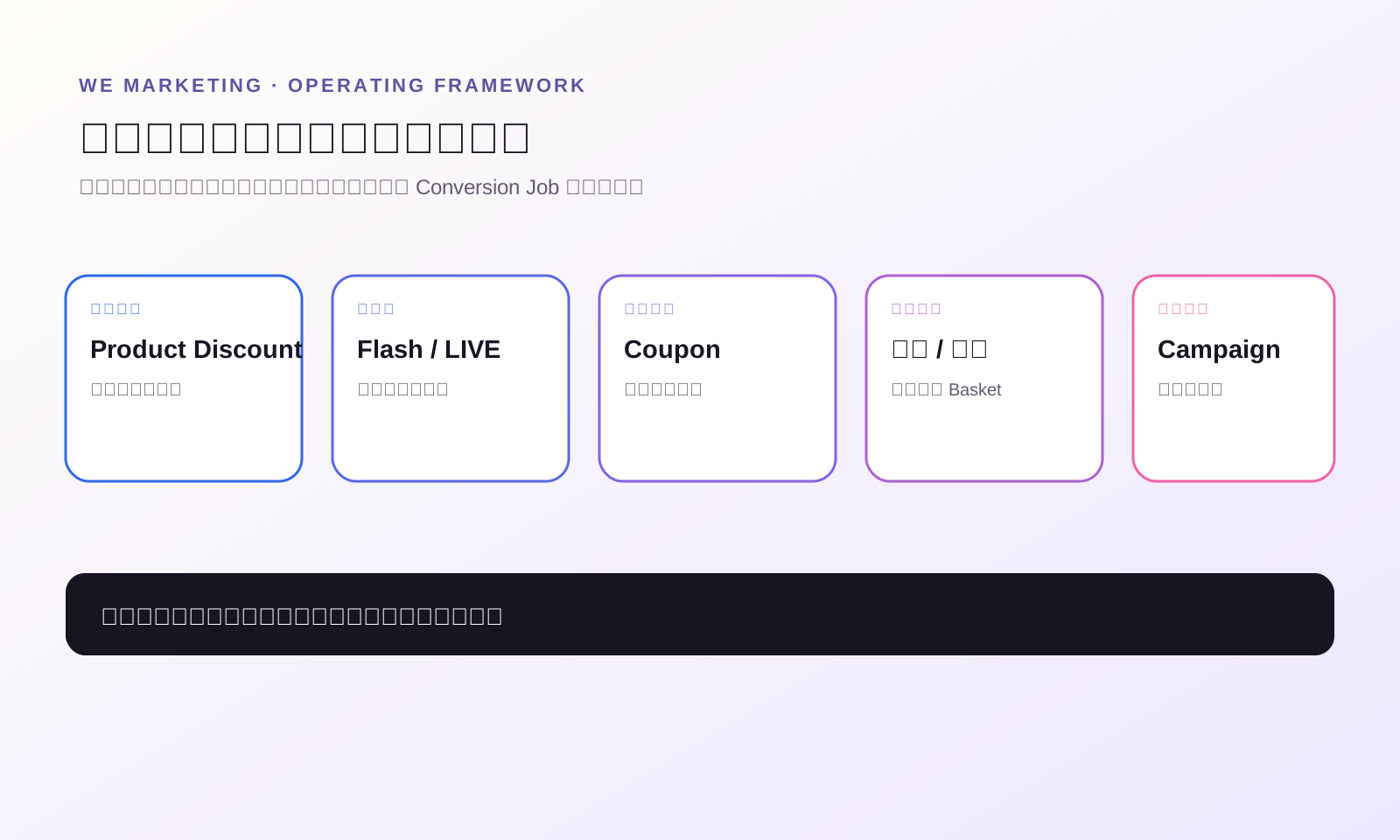
每一层优惠只负责一个主要任务
| 优惠层 | 适合承担的任务 | 不应该使用的理由 | 负责人要回答的问题 |
|---|---|---|---|
| Product Discount | 为特定 Product 或 SKU 建立可见基础优惠 | 长期制造没有依据的划线价 | 基础活动价和结束日期是什么? |
| Flash Sale 或 LIVE offer | 在短时间和有限库存内制造紧迫感 | 用低价掩盖内容和商品页问题 | 服务哪场活动、哪个渠道、多少库存、何时停止? |
| Coupon | 奖励明确的购物车、用户或渠道行为 | 因为转化低就再加一个百分比 | 消费者完成什么行为才能获得? |
| 满件优惠 | 提高有价值的 basket size | 强迫消费者多买低复购或高退货商品 | 多买一件是否真的创造用户价值和健康 contribution? |
| 运费优惠 | 降低配送成本带来的下单阻力 | 用卖家承担运费掩盖单件 economics | 哪个门槛可以保护毛利? |
| Campaign 或 TikTok-funded 层 | 参与明确活动或获得平台支持价值 | 假设平台一定补贴未确认的缺口 | 当前 campaign terms 和 settlement 确认了什么? |
一个优惠可能承担多个功能,但必须有一个主任务。如果 Product Discount 已经让 Hero SKU 具备竞争力,未必还需要一个全店 coupon。如果 LIVE Flash Sale 是当天的转化节点,就应该用精确时间和库存边界管理,而不是在前后长期保留一个深折扣。
不要为同一个 conversion job 支付两次,除非叠加是经过模拟、核算和批准的。
先建 Promotion Ledger,再进入 Seller Center
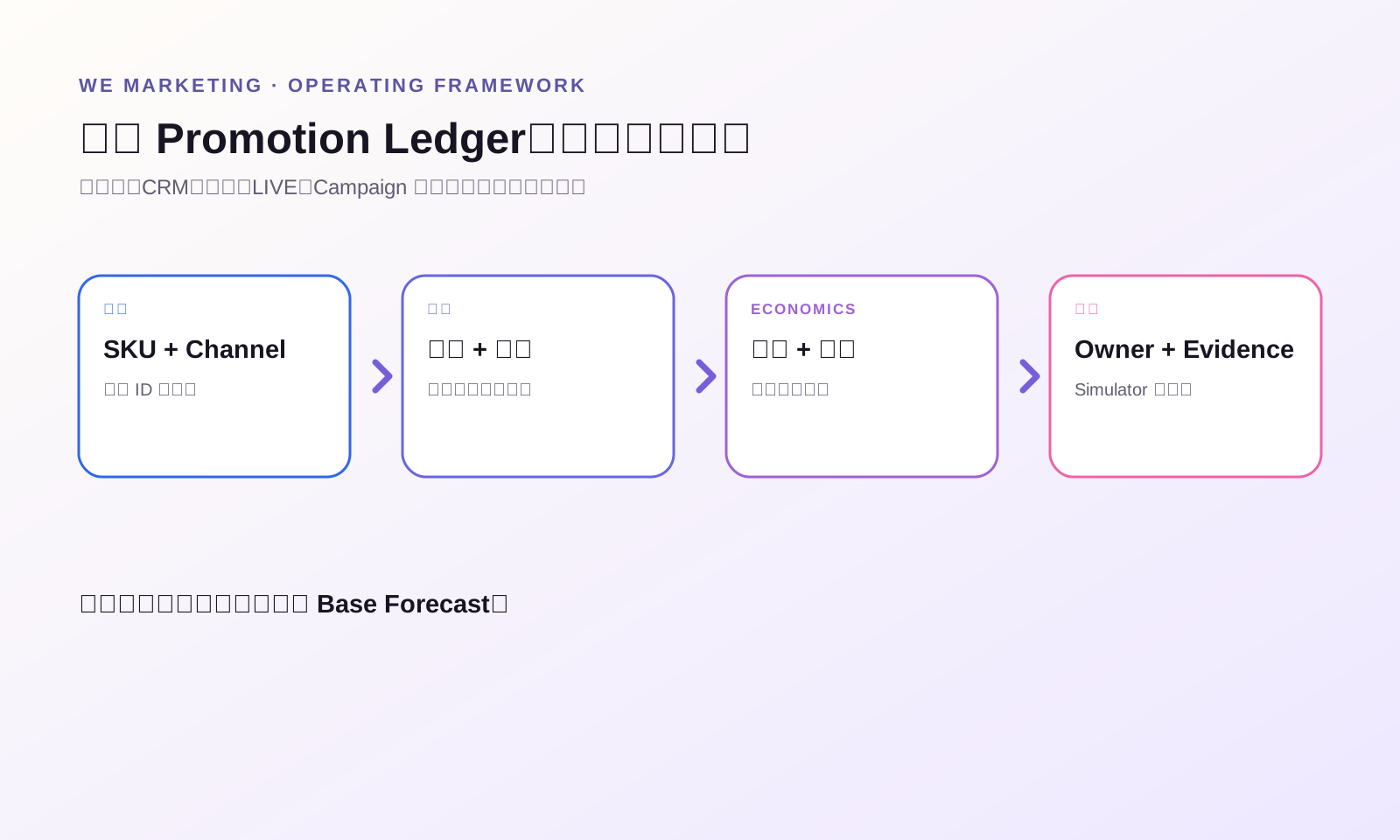
WEM 建议所有 active 和 scheduled offer 共用一张 Promotion Ledger:
| 字段 | 需要记录的内容 |
|---|---|
| Offer ID | 在 brief、calendar 和 review 中统一使用的内部名称 |
| SKU scope | 准确的 Product 与 Variation ID |
| Customer job | 试用、紧迫感、提高客单、复购、campaign access 等 |
| Channel | PDP、Shop、达人视频、LIVE、CRM 或 campaign |
| Funding | Seller-funded、TikTok-funded、co-funded 或未确认 |
| Time | 开始、结束、时区和达人沟通截止时间 |
| Stock | 可售库存、reserved stock、purchase limit 和 stop threshold |
| Price | 日常价、每层优惠、模拟最终价和卖家承担金额 |
| Economics | Contribution floor 及扣除变量成本后的预计贡献 |
| Owner | 有权限发布、暂停、同步和核对结算的人 |
| Evidence | Simulator 截图、campaign terms、test cart 和订单 settlement |
达人 brief 里出现价格之前,就要完成这张表。达人内容可能在优惠结束后继续带来流量,也可能重复一个只适用于特定渠道的价格。给达人准确 SKU、优惠条件、有效时间和用户需要满足的门槛。如果最终价会因为资格或平台出资而变化,就说明条件,不要承诺所有用户都能拿到同一个价格。
LIVE 场景还要把 Ledger 接入 run of show。主播需要知道哪个 SKU 正在生效、几点开始、限购多少、还剩多少库存、何时结束。客服也要拿到同一份信息,避免消费者拿旧截图咨询时,团队无法解释。
把 Promotion Simulator 设为发布 Gate
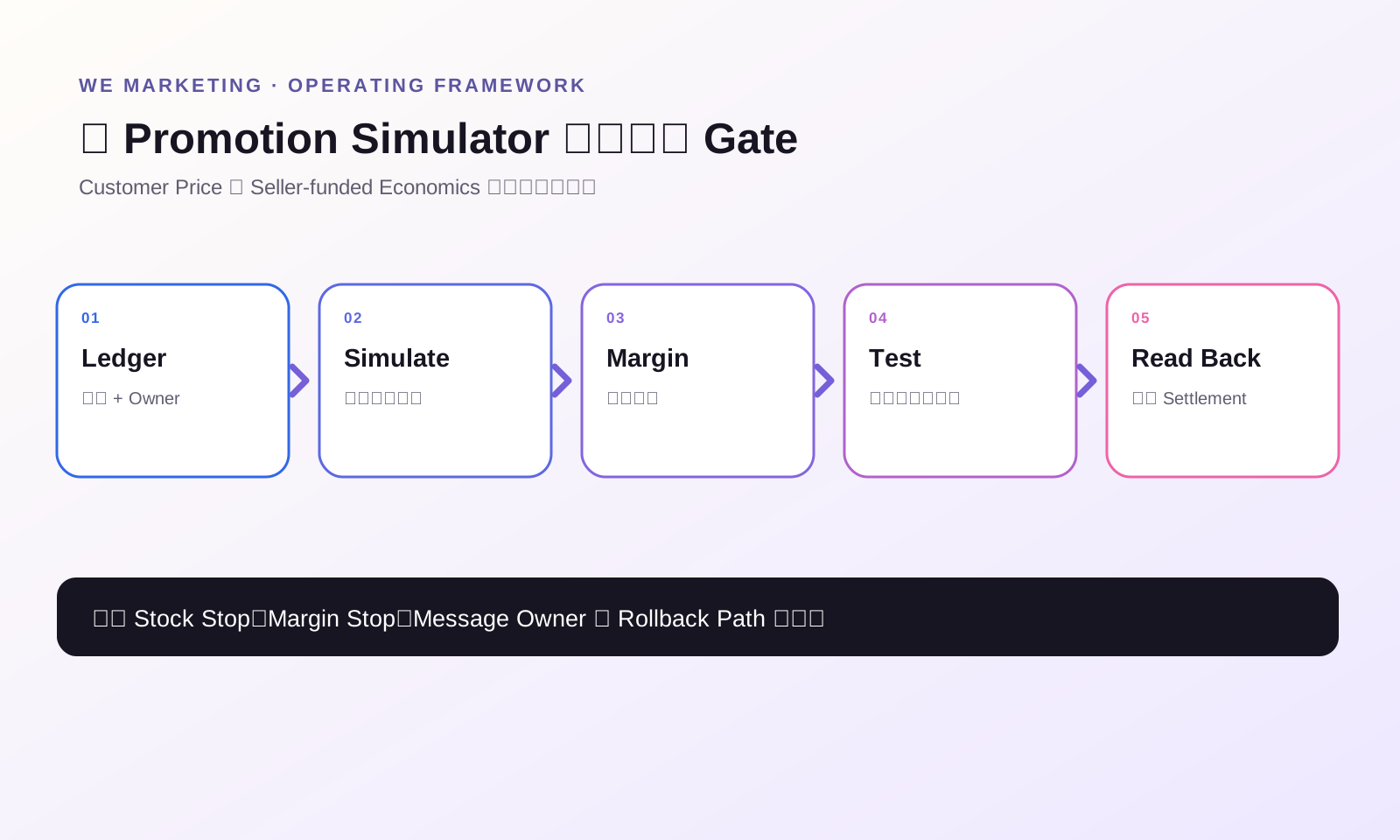
TikTok Shop 美国站 stacking guide 建议使用 Promotion Simulator,因为不同优惠层可能叠加,也可能出现优先级。Product Discount 官方材料还说明,系统会提供 stacking details,并在组合优惠非常深时显示实时提示。但安全发布不能只停在看到提示。
1. 模拟准确 SKU 和准确时间
不同 variation 的价格、成本和库存可能不同。不要只测 Product 层。使用真实 SKU、消费者条件和重叠时间,并保存带时间戳的结果。
2. 把模拟价与内部底线比较
Simulator 回答消费者可能支付多少。Margin model 回答卖家能不能承担。把佣金、履约、预期退货、项目费用和仍在运行的广告成本一起计算。
3. 测试消费者真实页面
去 Product Detail Page、Cart、LIVE shopping bag 或 campaign 页面检查。确认商品、价格文案、资格条件、限购、运费和截止时间。后台设置正确,不等于前台信息一定容易理解。
4. 带着 Stop Rule 发布
Stop rule 可以是库存底线、contribution floor、卖家最高出资额、客服错误率或 campaign cutoff。负责人要知道谁有权暂停,以及如何马上同步给达人和主播。
5. 核对一个真实订单
上线后尽早查看一笔真实订单和 settlement breakdown。确认用户实际支付、seller-funded 和 TikTok-funded 的金额与计划一致。不要等到放量后才发现错误。
把 Seller-funded 和 TikTok-funded 分开管理
TikTok Shop 当前美国站 TikTok-funded Promotions 指南把平台出资优惠与卖家优惠分开,并说明平台出资可能出现在 PDP、LIVE shopping bag、showcase、cart 等页面。官方材料也说明了部分 LIVE 和平台 incentive 组合当前的 stacking 边界。
运营上不要背一张“永久 stacking matrix”,而要给每层优惠标记 funding status:
- 已确认 seller-funded
- 已确认 TikTok-funded 或 co-funded,并保留当前 campaign 证据
- 未确认,在 base forecast 中按 0 处理
同一个消费者价格,如果平台承担一部分,可能依然健康;如果卖家默默承担全部,可能直接亏损。不要从用户看到的 badge 反推内部 P&L,要以 campaign terms 和 settlement 为准。
如果意外出现平台补贴,不要立刻再加深 seller discount。先确认它是否叠加、覆盖哪些 SKU 和人群、持续多久,再决定是否调整。
保护 Price Integrity 和未来 Campaign 空间
TikTok Shop 当前 Product Discount、Flash Sale 和 campaign 资料都把促销展示或参与要求与历史价格、消费者信任联系起来。不同工具和活动会使用不同时间窗口或阈值,所以应以实时报名页为最终规则。
这意味着 price history 是运营资产。长期无计划的低价可能压缩下一场重要活动的空间。虚高 list price 可能无法获得预期的 strikethrough 展示,也会破坏信任。今天的转化提升,如果训练消费者永远等低价、压缩 contribution 或影响后续 campaign,就不是真正增长。
每个 SKU 保留:
- 日常真实成交价
- Seller promotion price
- Campaign price
- 当前报名工具显示的相关 lowest price
- 每次开始和结束时间
- Units、conversion、contribution、returns 和 new-customer share
用这份历史规划未来 30、60、90 天。明确哪些节点值得制造 urgency,哪些 SKU 应该守价。Hero SKU 可以用窄范围试用优惠,bundle 可以创造 basket value,补货型商品可以使用 targeted retention value,而不是继续公开降价。
用周复盘判断架构是否有效
GMV 不能单独回答优惠是否健康。需要同时复盘 customer job、economics 和后续行为。
试用优惠看新客占比、首单 contribution、复购和退货;紧迫感优惠看计划时间内 sell-through、取消、缺货和是否带动其他商品;满件优惠看 units per order、关联购买、履约错误和 contribution;达人或 LIVE offer 要把内容表现、商品点击、转化、佣金、优惠成本和用户问题一起看。
每周用同一组问题:
1. 实际有哪些 promotion 组合同时生效? 2. 用户最终拿到了什么价格? 3. 卖家和平台分别承担了多少? 4. 哪些 SKU 触发 contribution 或库存 stop threshold? 5. 哪些达人、LIVE、CRM 或 campaign 信息已经不准确? 6. 哪个 offer 应该重复、缩小、重做或删除?
这样折扣才会变成学习系统。否则团队每次看到转化下降就再加一层,却从不移除旧优惠。
运营示例:一个 Hero SKU、一场活动、一个可控组合
以下是假设性运营示例,不是 WEM 客户结果。
某美妆品牌 Hero SKU 日常价为 40 美元,准备通过两小时 creator LIVE 获取新客。团队没有让多个全店优惠自由重叠,而是定义:
- Product Discount 负责当周基础促销价。
- LIVE-specific offer 只负责两小时紧迫感,并设置 reserved unit limit。
- Cart coupon 只有在 Simulator 与 margin model 证明它承担不同任务时才保留。
- TikTok-funded value 只有在实时 campaign 确认后才计入。
- 主播收到的是条件和截止时间,不是“所有人一定同价”的承诺。
- 运营负责人检查第一笔订单,并在库存或 contribution threshold 触发时停止。
重点不是具体百分比,而是流量到来之前,团队能说明目的、最终价格、出资、库存、毛利、传播口径和停止规则。
今天最小可执行动作:30 分钟 Offer Collision Audit
列出未来 14 天影响 Top 3 SKU 的全部 active 和 scheduled promotion。补上 regular price、每层优惠、funding source、owner、time window 和 stock limit。未知字段直接标红。
然后打开 Promotion Simulator,测试风险最高的一组重叠。把最终 customer price 与 contribution floor 比较。任何没有独立任务或没有 owner 的层,都要删除、缩小或错开时间。保存一次 simulator 或 test-cart 证据,并指定一个人核对首笔真实订单。
这 30 分钟,就能让团队从“做优惠”走向“管理折扣架构”。
常见问题
TikTok Shop 的 promotion 一定会叠加吗?
不会。TikTok Shop 美国站 Promotion Stacking Rules 说明,并非所有 promotion 都能同时使用,并建议通过 Promotion Simulator 查看哪些 discount layer 生效以及优先级。要用真实 SKU、时间、用户条件和当前 campaign terms 验证。
Product Discount 和 Flash Sale 有什么区别?
当前美国站官方资料把 Product Discount 描述为 Product 或 Variation 层的促销价,把 Flash Sale 描述为 Product 或 SKU 层的限时紧迫感工具。在相关重叠中,Flash Sale 可能具有价格展示优先级。具体仍要以当前设置页和 Simulator 为准。
怎么避免意外 Over-discount?
建立统一 Promotion Ledger,计算 contribution floor,模拟完整重叠,测试用户前台,设置库存和毛利 stop rule,并核对真实订单。平台提示有帮助,但不能替代成本模型。
TikTok-funded discount 可以直接计入毛利预测吗?
只有在出资方、SKU、人群、时间和 stacking behavior 都通过实时项目条款确认后,才计入预测。上线后还要在 Seller Center 的 settlement 中核对。未确认的平台出资,在 base forecast 中按 0 处理。
深折扣会影响未来 campaign 吗?
可能。当前 Academy 资料把促销资格和 strikethrough 展示与历史价格及消费者信任联系起来。设置今天优惠前,先查看下一场 campaign 的实时价格要求,并维护 SKU 级 price history。
达人在内容里应该怎么说优惠?
给达人准确商品、优惠条件、渠道和有效时间。如果最终价值取决于用户资格、stacking 或平台出资,就说明条件,不要承诺统一 checkout price。优惠结束或变化时要及时更新达人。